If you work at a desk, you've likely heard the warnings: sitting is the new smoking. But as electric standing desk systems have surged in popularity, a more nuanced question has emerged: are standing desks actually good for your health, or is this just another workplace wellness trend destined to fade? The answer, backed by substantial research and adopted by major corporations including Apple, is a resounding yes—but with important caveats about how you use them.
The science is clear: prolonged sitting carries significant health risks, from cardiovascular disease to increased mortality rates. Even regular exercise doesn't fully counteract hours of uninterrupted sitting. This reality has driven widespread adoption of height-adjustable desk systems, particularly those powered by precision linear actuators that enable smooth transitions between sitting and standing positions. When Apple CEO Tim Cook equipped all Apple employees with quality standing desks, he wasn't following a fad—he was responding to compelling evidence that workplace ergonomics directly impact employee health and productivity.
In this comprehensive guide, we'll examine the research behind standing desks, explore how modern electric desk lift systems work, and provide technical guidance on selecting the right mechanism for your workspace. Whether you're outfitting a home office or specifying equipment for an entire workplace, understanding the engineering and health implications will help you make an informed decision.

A mechanism that is technically capable but practically inconvenient will not be used. In motion design, the friction the user feels matters more than the friction the catalog lists.
"A standing desk only delivers health benefits if people actually change position. The mechanism's job isn't just to lift — it's to remove every reason not to lift. Once cranking takes 30 seconds, the desk stops moving. Once a button takes 10 seconds, it gets used all day." — Robbie Dickson, Founder and Chief Engineer of FIRGELLI Automations
What does the science say about sitting and health risks?
Recent epidemiological studies paint a concerning picture of sedentary behavior. The average adult now spends approximately 60% of waking hours sitting—at desks, in vehicles, during meals, and during leisure time. This represents a dramatic shift from even a generation ago, and the health consequences are measurable and significant.
Research published in prominent medical journals has established clear correlations between sitting time and adverse health outcomes. One comprehensive analysis found that each additional hour of daily sitting time was associated with increased all-cause mortality risk, independent of other health factors. The mechanism appears to be multifaceted: prolonged sitting reduces metabolic rate, impairs glucose regulation, and affects lipid metabolism in ways that promote cardiovascular disease.
Perhaps most surprisingly, the negative effects of extended sitting persist even among people who exercise regularly. A landmark study in the Journal of Medicine and Science examined the relationship between sitting time and mortality rates across different activity levels. The findings revealed that 30 minutes of daily physical activity—the amount typically recommended by health authorities—is insufficient to counteract the physiological impact of eight or more hours of sitting. Cardiovascular mortality risk remained elevated even in active individuals who spent most of their day seated.
This research has prompted major technology companies and forward-thinking organizations to reconsider workplace design. Apple's decision to provide standing desks to employees reflected not just corporate wellness theater, but practical application of health science. The Apple Watch even includes stand reminders that alert users after 50 minutes of inactivity, reinforcing the principle that regular position changes matter more than isolated exercise sessions.
What are the proven health benefits of standing desks?
The solution to excessive sitting isn't simply standing all day—that brings its own problems, including lower back pain and leg fatigue. Instead, the health benefits come from alternating between sitting and standing throughout the workday. Modern electric standing desks make this transition effortless, which is crucial for compliance. Manual crank systems, by contrast, create enough friction that users rarely bother adjusting them.

Cardiovascular Improvements
Standing increases heart rate modestly compared to sitting—approximately 8-10 beats per minute. Over the course of a workday, this difference translates to significantly higher caloric expenditure and improved cardiovascular function. Blood flow improves in standing positions, reducing the risk of deep vein thrombosis and other circulatory issues associated with prolonged sitting.
Metabolic Benefits
Postural changes affect how your body processes glucose and lipids. Studies show that alternating between sitting and standing helps maintain more stable blood sugar levels throughout the day, particularly after meals. This metabolic advantage is especially relevant for individuals at risk for type 2 diabetes or metabolic syndrome.
Reduced Back and Neck Pain
Office workers frequently report chronic back and neck discomfort from sustained sitting in suboptimal postures. Height-adjustable desks allow users to find ergonomically optimal positions for both sitting and standing, reducing strain on the spine and surrounding musculature. The ability to change positions regularly prevents the stiffness that develops from static postures.
Improved Energy and Focus
Users of standing desks consistently report subjective improvements in energy levels and concentration. While partially psychological, there's also a physiological component: increased blood flow and oxygenation to the brain when standing. The act of standing signals alertness to the nervous system, countering the post-lunch drowsiness that plagues seated workers.
What types of standing desk mechanisms exist?
Not all standing desks deliver equal benefits. The mechanism that enables height adjustment fundamentally determines whether users will actually change positions regularly—the key to health benefits. Understanding the engineering differences helps explain why electric systems dominate the professional market despite higher initial costs.
Manual Crank Standing Desks
Manual height-adjustable desks use a hand crank connected to a mechanical gearing system. Rotating the crank winds or unwinds a threaded drive mechanism that raises or lowers the desk surface. While mechanically simple and requiring no electrical power, manual systems suffer from a critical flaw: they're inconvenient enough that users rarely adjust them.

Transitioning from sitting to standing height with a manual crank typically requires 30-45 seconds of continuous cranking. If you're performing this action multiple times daily, it becomes tedious exercise rather than seamless workflow adjustment. Behavioral studies show manual desk users adjust their desk height far less frequently than electric desk users—often only once per day or less—defeating the core health purpose.
Manual systems do offer advantages in specific scenarios: they're appropriate for locations without convenient electrical access, cost less initially, and have fewer components that can fail. For workshops or semi-industrial environments where the desk might be adjusted once per day or less, manual mechanisms remain viable. For office environments where frequent adjustment is desired, they're counterproductive.
Electric Motorized Standing Desks
Electric standing desks represent a significant engineering advancement over manual systems. These mechanisms use precision linear actuators integrated into each leg of the desk frame. A central control box coordinates the actuators, ensuring synchronized movement even when desk weight is unevenly distributed.

The linear actuators used in quality standing desks are typically 12V or 24V DC systems featuring internal gearing that converts rotational motor movement into linear extension. These actuators must meet demanding specifications: smooth operation under load, quiet performance in office environments, and reliable synchronization between multiple units. The actuator technology is similar to that used in TV lifts and other precision positioning applications, but optimized for the duty cycle and load characteristics of desk use.
A control panel mounted to the desktop provides the user interface. Better systems include programmable memory positions—typically 2-4 presets that store preferred heights. This feature, similar to memory seat adjustments in vehicles, removes even the small barrier of manually adjusting to the correct height. Press a button, and the desk smoothly transitions to your preferred sitting or standing position in 10-15 seconds.
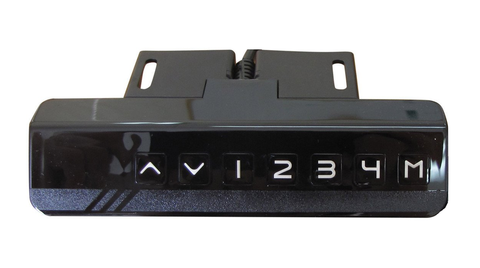
The control systems in premium electric desks include anti-collision detection, which stops movement if the desk encounters unexpected resistance. This safety feature prevents damage to equipment or injury to users. Digital displays show current height in inches or centimeters, helping users maintain consistent ergonomic positioning.
What is the difference between two-stage and three-stage actuator legs?
The telescoping leg assemblies used in electric standing desks come in two configurations: 2-stage and 3-stage. This specification significantly affects both the height range and the price point of the desk system.
Two-Stage Leg Systems
A 2-stage leg consists of two nested tubular sections. The inner section extends from within the outer section, providing height adjustment. These systems are more economical because they contain fewer components and require less complex machining. The linear actuator mechanism drives the inner section outward or pulls it inward.
The limitation of 2-stage systems is height range. With only two sections, the minimum and maximum heights are constrained by the overlap required for structural stability. Typical 2-stage desks offer a height range of approximately 10-12 inches, which may be insufficient for users at height extremes or for desks that need to accommodate multiple users of very different heights.
Three-Stage Leg Systems
Three-stage legs add an intermediate telescoping section, creating three nested tubes. This configuration allows greater extension while maintaining structural rigidity through increased overlap between sections. The result is height ranges of 16-20 inches or more—enough to accommodate users from under 5 feet tall to well over 6 feet tall in both sitting and standing positions.
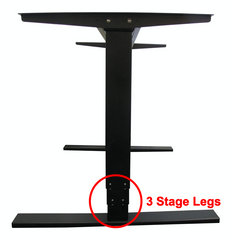
The additional complexity of 3-stage systems increases manufacturing cost and requires more sophisticated control systems to ensure smooth, synchronized movement of multiple segments. However, for professional applications and for users serious about ergonomic optimization, the investment is justified. The ability to achieve both a proper sitting height (where forearms are parallel to the floor with shoulders relaxed) and a proper standing height (with the same ergonomic arm position) makes the desk usable across its full range.
When specifying a standing desk, 3-stage legs should be considered standard for serious ergonomic implementations. The 2-stage option is appropriate mainly for secondary workstations or scenarios where budget constraints are paramount and users fall within a narrow height range.
| Specification | 2-Stage | 3-Stage |
|---|---|---|
| Nested tube sections | 2 | 3 |
| Typical travel range | 10–12 in | 16–20+ in |
| Structural complexity | Lower | Higher |
| Cost | Lower | Higher |
| Best for | Single user in mid-height range, secondary workstations, tight budgets | Multi-user setups, users under 5 ft or over 6'2", primary professional workstations |
| Synchronization demand on control system | Standard | More sophisticated |
| Recommended for serious ergonomic use | Optional | Standard |
What are the key selection criteria for a standing desk?
Choosing the right electric standing desk requires evaluating several technical specifications against your specific application requirements. Unlike consumer furniture where aesthetics dominate, standing desk selection should prioritize functional engineering parameters.
Height Range Specifications
The minimum and maximum heights achievable by the desk mechanism are perhaps the most critical specifications. Manufacturers typically provide these as overall heights from floor to desktop surface. For proper ergonomic positioning, your forearms should be parallel to the floor (or slightly declining) when typing, whether sitting or standing.
For seated positions, most users require desk heights between 23-30 inches, depending on chair height and leg length. For standing positions, the range extends to approximately 35-48 inches. Taller individuals (over 6'2") should verify that the desk's maximum height provides adequate clearance—this is where 3-stage systems become essential rather than optional.
Verify both the collapsed and extended heights against your requirements. A desk that doesn't go low enough creates ergonomic problems in the seated position, while insufficient maximum height defeats the standing function. If multiple users of significantly different heights will share the workstation, the full range becomes even more important.
Load Capacity Requirements
Electric standing desk mechanisms have rated load capacities typically ranging from 150 to 350 pounds. This specification accounts for both the desktop surface itself and everything placed on it. Underestimating load requirements leads to reliability problems, premature actuator failure, and safety hazards.
Calculate your actual load requirement by considering the desktop material and dimensions (larger solid wood surfaces can weigh 50+ pounds alone) plus all equipment: monitors (modern large displays can exceed 30 pounds), computers, keyboards, office accessories, and any specialized equipment. Add at least 20% safety margin to this calculation. If you're running multiple monitors, a desktop computer tower on the surface, and professional audio equipment, you can easily approach 200 pounds.
Higher capacity systems use more robust actuators with larger motors and stronger gearing. These add cost but provide smoother operation under load and greater long-term reliability. For home office use with a laptop and single monitor, standard capacity systems are adequate. For professional workstations with significant equipment, specify higher capacity mechanisms.
Base Width Adjustability
Electric standing desks typically use a two-leg design rather than four individual legs at each corner. This configuration reduces cost (each leg contains an expensive linear actuator) while providing adequate support for standard rectangular desks. Each "leg" is actually a beam that spans the depth of the desk.
Quality desk frames feature adjustable base width, allowing the distance between the two legs to be modified during installation. This accommodates varying desktop widths without requiring custom fabrication. Typical adjustment ranges span from 42 inches to 72 inches or more.
When selecting a desk frame, measure your intended desktop width and verify it falls within the frame's adjustment range. The legs should be positioned to provide balanced support—generally within 4-6 inches of each desktop edge. For unusually narrow or wide desktops, verify compatibility before purchase.
Special Configurations: L-Shaped and Multi-User Desks
Standard rectangular desks require only two actuator legs. L-shaped workstations, corner desks, and very large surfaces may require three-leg configurations to provide adequate support across the entire surface area. These systems use additional control coordination to ensure all three actuators move in perfect synchronization.
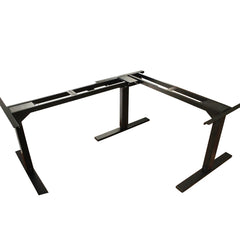
Three-leg systems increase both cost and complexity but are necessary for maintaining stable support across L-shaped or extra-wide surfaces. The control system must precisely coordinate three separate actuators, accounting for potential load imbalances across the larger surface area.
Noise Level Considerations
Electric standing desks generate some operational noise as the actuators extend and retract. Quality systems typically operate at 45-50 decibels—roughly equivalent to quiet conversation. Lower quality mechanisms can exceed 60 decibels, becoming disruptive in quiet office environments.
The noise primarily comes from motor operation and internal gearing within the actuators. Better systems use precision gearing with tighter tolerances and more sophisticated motor control, reducing noise. If your workspace requires quiet operation (recording studios, open offices, home offices in shared spaces), verify the manufacturer's noise specifications before purchase.
Speed of Adjustment
Electric desks typically adjust at speeds between 1.0 to 1.5 inches per second. This translates to a full height transition (from lowest to highest position) in approximately 15-25 seconds depending on the total travel distance. Faster isn't necessarily better—excessively fast movement can destabilize items on the desktop. The sweet spot is fast enough to avoid workflow interruption but controlled enough to maintain stability.
How do you install and set up an electric standing desk?
One significant advantage of modern electric standing desk systems is straightforward installation. The engineering approach used by quality manufacturers—pre-wired actuators, central control boxes, and standardized connections—simplifies assembly enough that most users can complete installation without professional assistance.
Standard Installation Process
Installation of a typical two-leg electric standing desk follows this general sequence:
- Assemble the leg frames to the desired width using the adjustable crossbeams
- Connect the linear actuators to the central control box using the provided cables
- Mount the control panel to the desktop in an accessible location
- Attach the assembled frame to the desktop using the provided mounting brackets
- Connect the power supply to the control box
- Perform initial calibration by cycling the desk through its full range
- Program memory positions for your preferred heights
The pre-wired approach eliminates electrical work. All connections use plug-and-socket interfaces similar to computer peripherals. The control box, typically mounted underneath the desktop out of sight, coordinates the actuators automatically—users don't need to program synchronization.
Converting Existing Desks
Electric standing desk mechanisms can be retrofitted to existing desktops, converting static desks into adjustable workstations. This approach preserves a desktop you prefer while gaining height adjustability. The process is remarkably straightforward—in some cases, installation can be completed without even removing items from the desktop surface.
When converting an existing desk, verify that the desktop material can support the mounting brackets securely. Solid wood, plywood, and quality engineered wood products work well. Particle board or very thin laminates may not provide adequate screw holding strength and could fail under load. The desktop should be at least 3/4 inch thick for secure mounting.
How do you use a standing desk for maximum benefit?
Simply owning a standing desk doesn't automatically improve health—the benefit comes from using it correctly. Research suggests specific patterns of sitting and standing yield optimal results.
Recommended Sitting-Standing Ratios
Health researchers generally recommend a gradual approach to standing desk use. Start with 20-30 minutes of standing per hour, alternating with sitting periods. Over several weeks, gradually increase standing time as your body adapts. The goal is not to stand all day—that brings its own health problems—but to break up prolonged sitting with regular position changes.
A commonly recommended pattern is the 20-8-2 rule: every 30 minutes, spend 20 minutes sitting, 8 minutes standing, and 2 minutes moving around. This approach maintains circulation and metabolic activity without causing the fatigue associated with all-day standing.
Ergonomic Positioning
Whether sitting or standing, proper ergonomic positioning is essential:
- Monitor height: The top of your primary display should be at or slightly below eye level, approximately an arm's length away
- Keyboard position: Forearms parallel to floor or slightly declining, wrists neutral
- Standing posture: Weight balanced on both feet, knees slightly bent (not locked), core engaged
- Sitting posture: Feet flat on floor, thighs parallel to floor, lumbar support engaged
Use the memory preset functions on your electric desk to store these optimal positions. This eliminates guesswork and ensures consistent ergonomic positioning throughout the day.
Complementary Equipment
Standing desks work best as part of a complete ergonomic setup. Consider adding an anti-fatigue mat for standing periods—these cushioned surfaces reduce leg and back strain. Adjustable monitor arms allow independent screen positioning regardless of desk height. An ergonomic chair remains important for sitting periods, ideally with adjustable height and lumbar support.
Conclusion
Standing desks are demonstrably good for your health when used correctly. The research supporting their benefits is substantial, spanning cardiovascular health, metabolic function, musculoskeletal comfort, and subjective well-being. The key is alternating between sitting and standing regularly throughout the day—not standing all day, but breaking up prolonged sitting with frequent position changes.
Electric standing desks powered by precision linear actuators make this alternation effortless enough that users actually do it. Manual systems, despite lower costs, create enough friction that behavior change rarely occurs. The engineering sophistication of modern electric desk systems—synchronized actuators, programmable presets, smooth operation under load—transforms height adjustment from an occasional event to a seamless part of workflow.
When selecting a standing desk, prioritize technical specifications over aesthetics: adequate height range for your stature, appropriate load capacity for your equipment, and 3-stage actuators if budget permits. Quality electric mechanisms represent a meaningful investment in long-term health, potentially adding productive years to your working life while reducing the health risks of sedentary work.
What usually goes wrong with electric standing desks?
Most standing-desk problems are predictable and fall into a few recurring failure modes. Designing around them up front avoids the bulk of long-term reliability issues.
- Overloading the actuators. Load capacity is the desk weight plus everything on it. Exceeding the rated load — often 150–350 lb — leads to premature actuator wear and motor burnout. Always add a 20% safety margin over your actual equipment total.
- Mounting to weak desktops. Particle board and thin laminate cannot hold mounting screws under load, and the frame eventually pulls free. Use solid wood, plywood, or quality engineered wood at least 3/4 in thick.
- Actuator desync. On multi-leg desks, uneven loading or a failing control box can cause one leg to lag, racking the desktop. The control system must coordinate all legs; verify smooth synchronized motion during initial calibration.
- Noise from low-grade gearing. Cheap actuators exceed 60 dB and become disruptive in quiet rooms. This is a gearing-tolerance problem set at manufacture, not something the user can fix later.
- Disuse. The most common failure isn't mechanical. A manual desk that takes 30–45 seconds to crank stops getting adjusted, so the health benefit disappears even though the mechanism still works.
How should you test a standing desk before trusting it daily?
A short commissioning routine catches almost every problem that would otherwise show up weeks later under daily load.
- Run the full travel range unloaded. Cycle from lowest to highest position at least three times and confirm smooth, even motion with no binding or audible stalls.
- Repeat under real load. Place all intended equipment — monitors, computer, accessories — on the desktop and run another full cycle. The desk should not slow visibly or sound strained.
- Check leg synchronization. Sight down the desktop edge during travel; the surface should remain level. Any visible tilt indicates a control or actuator issue.
- Verify anti-collision. Gently obstruct the desk during descent with a soft object; movement should stop immediately.
- Measure noise at seated head height. Quality systems run 45–50 dB. Anything noticeably louder will become irritating in daily use.
- Save and recall memory presets. Confirm the desk returns to the exact stored height repeatedly. Consistent recall proves position feedback is reliable.
Frequently Asked Questions
How much should I stand versus sit during the workday?
Research suggests starting with 20-30 minutes of standing per hour and gradually increasing as your body adapts. The goal is not to stand all day—that can cause its own problems including leg fatigue and back pain—but to break up sitting with regular position changes. A good target is alternating every 30-60 minutes. Many experts recommend the 20-8-2 pattern: 20 minutes sitting, 8 minutes standing, 2 minutes moving around. Use the programmable memory settings on your electric desk to make transitions seamless.
Will a standing desk help me lose weight?
Standing burns approximately 50 additional calories per hour compared to sitting—a modest increase unlikely to produce significant weight loss alone. Over a year of regular standing desk use, this might translate to 5-10 pounds, but the real health benefits come from improved cardiovascular function, better glucose metabolism, and reduced sitting-related disease risks rather than weight loss. Think of standing desks as part of overall health optimization rather than a weight loss tool.
What height range do I need for my standing desk?
The required height range depends on your stature and chair height. Most users need a seated desktop height between 23-30 inches and standing height between 35-48 inches. Taller individuals (over 6'2") should verify the maximum height is adequate—this typically requires 3-stage actuator legs rather than 2-stage systems. To determine your ideal heights, measure from the floor to your elbow when seated and standing with arms at 90 degrees—your desktop should be 1-2 inches below this measurement.
Are manual crank standing desks worth the lower cost?
Manual standing desks cost less initially but studies show users rarely adjust them frequently enough to gain health benefits. The 30-45 seconds of cranking required for height changes creates enough friction that most users adjust once daily or less—defeating the purpose. Electric systems with push-button control enable the frequent position changes that actually improve health. Unless budget constraints are severe or the desk will be adjusted infrequently, electric systems deliver significantly better value despite higher initial costs.
How much weight can electric standing desks support?
Load capacities typically range from 150 to 350 pounds depending on the actuator system. Calculate your requirement by adding desktop weight (solid wood can exceed 50 pounds) plus all equipment: monitors, computers, accessories. Add 20% safety margin to this total. Multiple large monitors, desktop computers, and professional equipment can easily approach 200 pounds. Higher capacity systems use more robust linear actuators and provide better long-term reliability. Don't underestimate load—actuator failure under excessive weight is expensive and potentially dangerous.
Can I convert my existing desk to a standing desk?
Yes, electric standing desk mechanisms can be retrofitted to existing desktops. The frame attaches using mounting brackets secured to the underside of your current desktop. The desktop must be at least 3/4 inch thick solid wood, plywood, or quality engineered wood—particle board may not provide adequate screw holding strength. Measure your desktop width to ensure it falls within the adjustable range of the frame (typically 42-72 inches). Converting existing desks preserves a surface you like while gaining height adjustability at lower cost than complete replacement.
How loud are electric standing desks during adjustment?
Quality electric standing desks operate at 45-50 decibels—roughly equivalent to quiet conversation or light rainfall. The noise comes from the motors and internal gearing in the linear actuators. Lower quality systems can exceed 60 decibels, becoming disruptive in quiet environments. If noise is a concern—such as in recording studios, open offices, or shared home workspaces—verify the manufacturer's specifications before purchase. Precision actuators with tighter tolerances and sophisticated motor control produce less operational noise.


