Projecting your smartphone screen onto a wall seems easy, but you quickly run into image problems if you just guess at distances. Things get blurry, too small, or the picture flips upside down. The optics aren’t complex, but the spacing all comes down to the thin lens equation—nothing works right if you ignore the numbers. Use this Smartphone Projector Calculator to sort out image distance, magnification, projected size, required focal length, or how far your phone needs to sit from the lens. If you're building a DIY projector for home, demonstrating optics in class, or just need a quick projection in a pinch, these calculations will keep you out of the common traps. Below you’ll find the formulas, a step-by-step example, some practical notes on brightness and lens flaws, plus an FAQ about the common mistakes that eat up time on the bench.
What is a Smartphone Projector?
A smartphone projector uses a single convex lens to spread the light from your phone’s screen onto the wall at a much larger size. The lens takes the small image and projects it out—same optical principle used in old slide or film projectors—letting you get a big display out of a small device. It’s a straightforward setup if you're familiar with basic lens rules.
Simple Explanation
If you've ever used a magnifying glass to project a candle flame onto a wall, it's the same basic idea: move the lens around and there’s one position where the image is sharp and bright. In a projector, your phone takes the place of the candle, the lens is still just a magnifying glass, and the wall is your “screen.” The real challenge is finding the right distance between phone and lens so your image is both focused and lands on your wall at the desired size.
📐 Browse all 1000+ Interactive Calculators
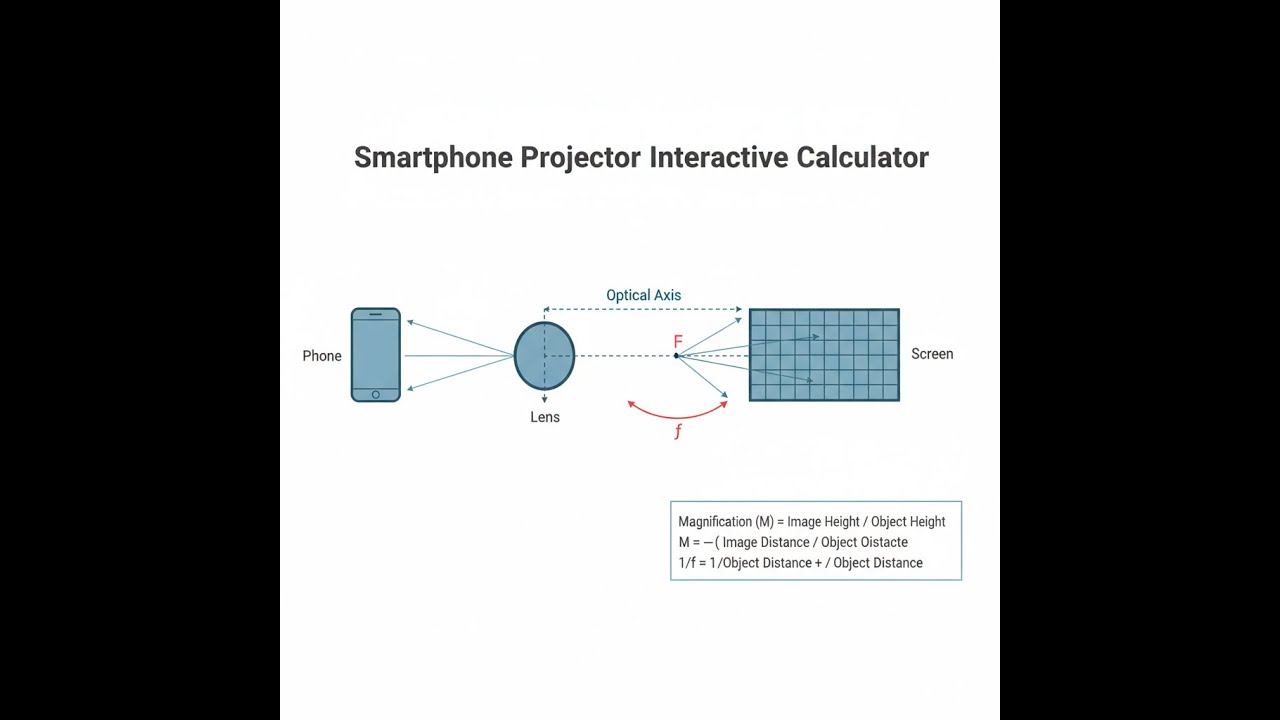
Optical Diagram: Smartphone Projector Ray Geometry

Smartphone Projector Calculator
How to Use This Calculator
This calculator is intended for education, concept evaluation, and preliminary design. Results are based on the equations and assumptions described on this page, but cannot account for every real-world load case, tolerance, material property, environmental condition, installation detail, safety factor, code, or regulatory requirement. Verify all inputs, assumptions, units, and results independently before selecting components or using the result in a real application. Safety-critical, structural, medical, lifting, transportation, or regulated applications must be reviewed by a qualified engineer.
Questions about this calculator or found an error? Message our engineering team.
- Select your calculation mode from the dropdown — pick what you need to solve for: image distance, object distance, focal length, screen size, magnification, or full system analysis.
- Type in your lens focal length (mm) and the phone-to-lens distance (object distance) as needed for the mode you chose.
- Enter the actual height of your phone’s screen (mm), not the diagonal size.
- Hit Calculate to get the result.
Smartphone Projector Interactive Visualizer
This tool makes it clear how moving the lens or phone changes the geometry. Adjust the sliders and watch how image size, focus, and magnification track with the classic lens equation in real time.
IMAGE DISTANCE
1275mm
MAGNIFICATION
7.5x
SCREEN SIZE
488mm
TOTAL DISTANCE
1445mm
FIRGELLI Automations — Interactive Engineering Calculators
Governing Equations
Thin Lens Equation
This formula links your lens’s focal length, the phone-to-lens distance, and the lens-to-wall (image) distance. You’ll need it for all the calculations on this page.
Where:
- f = focal length of the convex lens (mm)
- do = object distance (phone to lens, mm)
- di = image distance (lens to screen, mm)
Magnification Equation
This shows you how much bigger (and inverted) the wall image is versus the phone screen. Use it to predict actual projected size.
Where:
- M = lateral magnification (dimensionless, negative means upside down)
- hi = image height (projected screen size, mm)
- ho = object height (phone screen dimension, mm)
Image Size Calculation
This gives the final projected image size based on your magnification factor and screen height.
Total Projection Distance
Adds up how far the phone is from the wall—useful for checking the projector can actually fit in your space.
Where:
- Dtotal = total distance from phone to projection screen (mm)
Simple Example
Lens focal length: 100 mm. Phone screen height: 60 mm. Object distance (phone to lens): 120 mm.
Image distance: (100 × 120) / (120 − 100) = 12000 / 20 = 600 mm.
Magnification: 600 / 120 = 5x.
Projected screen height: 5 × 60 = 300 mm (30 cm).
Total projection distance: 120 + 600 = 720 mm (72 cm).
Theory & Practical Applications of Smartphone Projector Optics
The smartphone projector works with the basics of geometric optics—just a lens and the thin lens formula—but there are real trade-offs to keep in mind. Most DIY projectors use just one convex lens and put the phone’s screen at the right distance to form a magnified (but inverted) image on a wall. If you ignore the link between focal length, object position, and desired screen size, you won’t get a sharp or even visible result. The limitations aren’t just math; they’re a matter of picking your compromises on sharpness, brightness, and space. All of this comes down to practical realities, not just equations.
Physics of Convex Lens Image Formation
A convex lens brings parallel rays to a single focus (the focal point) — you can verify this with any lens and sunlight on a piece of paper. In smartphone projectors, the phone sits a little further from the lens than its focal length to produce a real, flipped, and magnified image. The key equation is 1/f = 1/do + 1/di. It strictly defines where you must place your lens and phone for your wall image to be sharp. Try to get too much magnification (object too close to f), and di shoots toward infinity—you’ll need a wall across the room. Move the phone too far back (do much bigger than f), the image shrinks and the whole setup gets much shorter, but you lose the “projected” effect. In practice, for most builds, do sits about 1.05 to 1.2 times the focal length—you’ll stay under 3 meters of projection and get a reasonable jump in screen size. It’s a tighter range than you might expect from the math alone.
Focal Length Selection and Lens Trade-offs
Most lenses for DIY smartphone projectors hit between 100 mm and 200 mm focal length—not because theory says so, but because anything shorter blurs out at the edges and longer lenses push your image across the room. Going below 120 mm, you get increasingly bad spherical aberration and field curvature, especially if the lens is a cheap plastic Fresnel. Colors smear with Fresnels at short focal lengths. If you go past 200 mm, you reduce optical flaws but your setup gets long—often too long for most real rooms. For most cases, a 150 mm lens at about 1.1 times its focal length will yield manageable projection distances and an image in the 50-70 inch range (from a 6-inch device). That’s the middle ground: not perfect, but usually the best you’ll get without spending far more on optics.
Brightness, Lumens, and Practical Viewing Constraints
Smartphone screens only emit about 400-600 cd/m² at full brightness. Since projected area grows as the square of your magnification, actual screen brightness drops off fast. At 10x magnification, you’re spreading the light from the phone across an area 100 times as big—so image brightness is only 1/100 of what the phone outputs, and a typical lens also eats up 15-25% of the light. That means at 10x, you land in the 4-6 cd/m² range—nowhere near bright enough for a lit room. This is why these simple projectors only work in dark rooms; the physics don’t care how new your phone is or how fine your lens is. Commercial projectors simply brute-force this with powerful lamps—DIY projects are always going to come up short if you want to use them in ambient light.
Applications Across Multiple Domains
Even with these brightness and image constraints, a simple projector can make sense for demos, classrooms, some home use, or teaching physics. Science teachers like them for hands-on optics demos when they can control the lighting. Backyard movie nights with a white sheet work, but don’t expect it to look like a real projector—your mileage will vary with darkness and wall size. You can get by in meetings if there’s absolutely no other projection equipment—just enough to show a slide or two, but it’s not going to impress anyone with detailed graphics or color. They're also a practical way for students and hobbyists to experiment directly with the lens equations and see the results, learning how moving the lens even a centimeter changes the outcome.
For more optical physics tools and calculators, visit our engineering calculator library.
Worked Example: Designing a Projector for 60-Inch Display
Problem: Let's say you want to hit a 60-inch diagonal screen in a small bedroom. Your phone is 142.5 mm tall (about 6.3 inches, tall/narrow). You’ve got a 165 mm lens. Find out how close the phone should be to the lens, the image distance, the actual magnification, and if this is reasonable for a small room.
Step 1: 60-inch diagonal at 16:9 aspect → height is about 742 mm. So you need M = 742/142.5 ≈ 5.2.
Step 2: From the lens and magnification equations, you work out do ≈ 197 mm.
Step 3: That means your lens-to-wall distance is di ≈ 1026 mm.
Step 4: Check the math with the lens equation and you’re close enough (within measurement error).
Step 5: Total length: about 1.22 meters from phone to wall—fits most small bedrooms easily.
Feasibility: This setup is practical: fits on a desk and gives you a modest 60-inch image. If you push for much bigger (80-100 inch), you’ll need more magnification and a much longer room—or a window to project out of.
Brightness: At 5.2x, your wall image is about 27x the phone area. If the phone outputs 500 cd/m² and the lens is 80% efficient, you get around 15 cd/m² on the wall—barely enough if it’s really dark. Any ambient light is going to wash out your picture. You can’t escape this with better optics; it's a hard limit from the phone’s own light output.
Frequently Asked Questions
Free Engineering Calculators
Explore our complete library of free engineering and physics calculators.
Browse All Calculators →🔗 Explore More Free Engineering Calculators
About the Author
Robbie Dickson — Chief Engineer & Founder, FIRGELLI Automations
Robbie Dickson brings over two decades of engineering expertise to FIRGELLI Automations. With a distinguished career at Rolls-Royce, BMW, and Ford, he has deep expertise in mechanical systems, actuator technology, and precision engineering.
Video Walkthrough - How to Use This Calculator
Need to implement these calculations?
Explore the precision-engineered motion control solutions used by top engineers.


