If you let failures slip through your process without a way to size up the risk, the team ends up spending more time fixing problems than preventing them. That's what the FMEA Risk Priority Number (RPN) is built for. This calculator quickly tallies up a numerical risk score from Severity, Occurrence, and Detection ratings (all set from 1–10). The method turns up everywhere risky failures matter: manufacturing, automotive, aerospace, and medical devices. Below you'll find the RPN formula, a full worked example, some straight talk on rating scales, and a no-nonsense FAQ.
What is FMEA Risk Priority Number?
The FMEA Risk Priority Number (RPN) is a score from 1 to 1000 that flags how risky a given failure mode is. It's just Severity × Occurrence × Detection — so the higher the score, the higher the priority for fixing that problem.
Simple Explanation
You set three numbers: how bad the result is, how likely it happens, and how likely you’ll catch it before it causes trouble. Multiply them. Low numbers mean low worry. If your RPN is high, you’ve got something worth fixing. Don’t get hung up on chasing a “perfect” 10 or a “safe” single-digit. You’re looking for the points that stick out far above the rest, so you know where to focus your resources.
📐 Browse all 1000+ Interactive Calculators
Table of Contents
How to Use This Calculator
- Select your calculation mode from the dropdown — standard RPN, reverse-engineer a required rating, action priority, or revised RPN after improvements.
- Enter your Severity (S), Occurrence (O), and Detection (D) ratings, each on a scale of 1 to 10.
- If your mode requires it, enter a Target RPN, Action Threshold, or Revised ratings in the additional fields shown.
- Click Calculate to see your result.
Simple Example
Severity = 7, Occurrence = 5, Detection = 4
RPN = 7 × 5 × 4 = 140
Risk level: HIGH — corrective action required. Focus on reducing severity or occurrence through engineering controls.
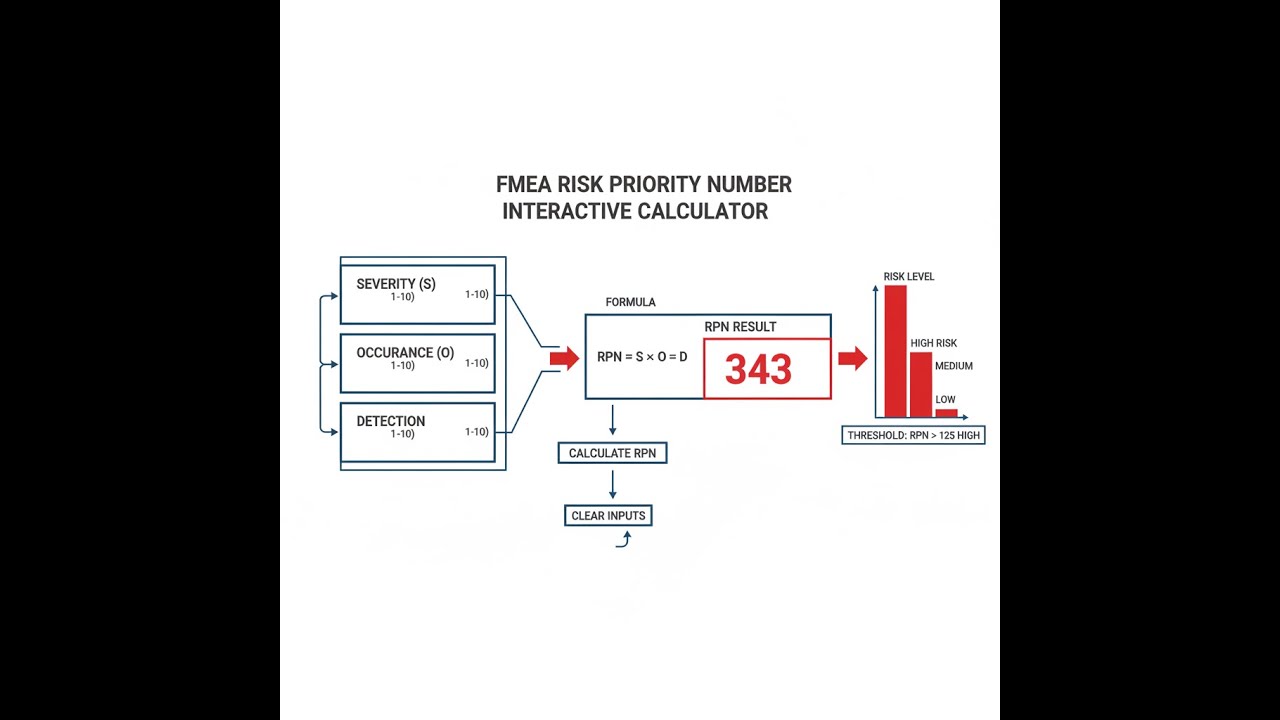
FMEA RPN Diagram

Interactive FMEA Risk Priority Number Calculator
This calculator is intended for education, concept evaluation, and preliminary design. Results are based on the equations and assumptions described on this page, but cannot account for every real-world load case, tolerance, material property, environmental condition, installation detail, safety factor, code, or regulatory requirement. Verify all inputs, assumptions, units, and results independently before selecting components or using the result in a real application. Safety-critical, structural, medical, lifting, transportation, or regulated applications must be reviewed by a qualified engineer.
Questions about this calculator or found an error? Message our engineering team.
FMEA Risk Priority Number Interactive Calculator
Calculate FMEA Risk Priority Numbers using Severity, Occurrence, and Detection ratings to prioritize corrective actions. Visualize how each rating dimension contributes to overall risk assessment and threshold management.
RPN VALUE
140
RISK LEVEL
HIGH
ACTION REQ'D
YES
PRIORITY
MEDIUM
FIRGELLI Automations — Interactive Engineering Calculators
Equations & Formulas
Here's the basic formula for the FMEA Risk Priority Number.
Risk Priority Number (RPN)
RPN = S × O × D
S = Severity rating (1-10, dimensionless)
O = Occurrence rating (1-10, dimensionless)
D = Detection rating (1-10, dimensionless)
RPN = Risk priority number (1-1000, dimensionless)
If you need to figure out what value you’d need on a particular rating to meet a target RPN, use the formulas below.
Required Rating Calculation (Reverse Engineering)
Srequired = RPNtarget / (O × D)
Orequired = RPNtarget / (S × D)
Drequired = RPNtarget / (S × O)
RPNtarget = Desired risk priority number (dimensionless)
To see the effect of improving controls or process changes, calculate RPN reduction this way:
RPN Reduction After Improvements
ΔRPN = RPNinitial - RPNrevised
Improvement % = (ΔRPN / RPNinitial) × 100
ΔRPN = Change in risk priority number (dimensionless)
RPNinitial = Original RPN before corrective actions (dimensionless)
RPNrevised = Updated RPN after implementing improvements (dimensionless)
Theory & Engineering Applications
Failure Mode and Effects Analysis (FMEA) is a core tool for risk assessment in engineering. RPN is its practical number — a systematic way to stack-rank what to fix, factoring in how bad a failure is, how often it might happen, and how likely you’ll catch it before it reaches the end user. All three are needed to avoid chasing the wrong problems.
The Three-Dimensional Risk Model
Traditional risk looks at probability and impact, but FMEA adds detectability — because it’s just as relevant to ask: can we catch this before damage is done? Multiplying these three ratings gives an RPN scale of 1 (best possible: low impact, rare, easy to detect) to 1000 (worst: catastrophic, frequent, undetectable). This scale is blunt by design; it forces separation but doesn’t try to deliver an illusion of fine precision.
For severity, think about the most realistic “what if” outcome if the failure slips through — not the absolute worst physics-defying outcome, and not just the average. In automotive, a 9 or 10 often connects to a real safety concern or regulatory breach. In medical devices, these numbers tie right back to risk categories for patients. Use the highest reasonable scenario, not the apocalypse.
Occurrence is based on how often things have actually failed, or what your best engineering judgment says for new stuff. If you’ve got data — MTBFs, defect rates, even previous similar jobs — use it. If you lack data, use the highest estimate you can defend and adjust it later. Each industry rates occurrence a little differently, and mapping those numbers to something statistical (like MTBF in aerospace, or bug counts in software) is often more art than science.
Detection is about the actual chance your system will spot the failure before it matters. Beware the trap: just because a process is “100% inspected” doesn’t mean detection is near-perfect, especially with manual checks. Factory workers and camera systems don’t miss defects at the same rates, even if the form says “inspected.” Lean toward real-world performance, not what’s on the spec sheet.
RPN Thresholds and Action Priority Logic
Most organizations set an RPN threshold to trigger action, anywhere from 80 to 125 depending on their risk appetite. But just relying on a set RPN cutoff can be risky. For major problems (like a severity of 9 or 10), you need a rule that says any of these get flagged, no matter what Occurrence or Detection says. Otherwise, you get odd cases where a dangerous failure passes under the threshold just because it’s unlikely or easily detected — which isn’t good enough if the cost of even one is too high.
When figuring out where to put your resources, reducing a big number by half feels more satisfying — but a lower-priority RPN may be much cheaper to drop. A lot of teams now weigh the risk reduction against implementation costs. If you’re dealing with budgets, look to show which fixes give the “biggest bang for the buck,” rather than blindly chasing whichever RPN is highest.
Worked Engineering Example: Hydraulic Actuator Assembly
Take a hydraulic linear actuator on an automated welding cell. Suppose “Seal degradation causing fluid leakage” is identified as a possible failure mode. Walk through each rating based on what you can actually observe or defend:
Severity: If fluid leaks, you might get misaligned welds. There’s a feedback system, so most gross problems get caught before the weld. Realistically, worst case is some structural issues on parts that get through, but the feedback reduces the risk. Assign S = 7.
Occurrence: Seals are rated for high cycle counts, but data shows some degrade earlier — on average, failure every 1 in 150 maintenance cycles. That’s O = 4.
Detection: Position sensors catch most drift well before catastrophic leaks, but the sensor logic isn’t perfect (software issues in the past). Assign D = 4, since detection is above average but not bulletproof.
So, RPN = 7 × 4 × 4 = 112. If your company acts at 100 or above, you need to fix this.
Here’s how you might address it:
Option 1: Better seal material — drops Occurrence to 2. RPN = 56, cost is moderate.
Option 2: Add a pressure sensor — drops Detection to 2. Also RPN = 56, cost is higher and implementation is more complex.
Option 3: Redesign fixture to avoid misalignment impact — drops Severity to 4. RPN = 64, but major up-front costs.
In this case, the company chose the better seal as a practical, cost-effective fix. Each step is documented in the FMEA, and any retrofits or upgrades get rolled in during routine maintenance, not overnight.
Industry-Specific Applications
Automotive suppliers are usually stuck using FMEA and RPN because quality standards mandate it. Those numbers are subject to customer audits, and there are rating tables that tie your occurrence rating to measured process capability (like Cpk values). In aerospace, FMEA is run on both hardware and software; ratings may be tied to things like defect density or code coverage for detection. Medical device makers need FMEA for regulatory submissions, and auditors will question any severe risks, even if their mathematically low RPN says it’s “OK.”
In process industries (chemical, food, pharma), FMEA may also cover environmental and safety risks. If a catastrophic but rare event gives an RPN that’s lower than a routine quality issue, you may need an override rule to keep those hazards from slipping through unaddressed.
For more engineering calculators or reference tools, check out our calculator library. You'll find stuff for reliability, statistical process control, and Six Sigma without fluff.
Practical Applications
Scenario: Medical Device Quality Engineer
A quality engineer runs FMEA on a new arthroscopic camera system. She finds a failure mode involving sterilization indicator ink. Severity = 8 (potential for patient infection), Occurrence = 3 (rare based on test data), Detection = 5 (visual catches most but not all). RPN is 120, above the company’s threshold. With a material and inspection change, she can model new ratings (Occurrence = 1, Detection = 2), and RPN drops to 16, making the case for spending on better inspection tech.
Scenario: Automotive Tier 1 Supplier Quality Manager
A Tier 1 supplier gets questioned during an audit: why is there no action for an RPN of 88 when the threshold is 80? The manager points out that the severity is 9 (safety issue) and shows the dual rule (RPN ≥ 100 OR Severity ≥ 9). He uses the calculator to check that reducing occurrence from 6 to 4 meets the customer’s requirement, giving the team a tangible target to hit that doesn’t require redesigning the entire part.
Scenario: Manufacturing Process Engineer
A process engineer is reviewing failure modes for a new CNC cell making aerospace parts. She enters all failure ratings, quickly sorts by risk, and sees which ones are above threshold. For a coolant contamination issue (S=6, O=7, D=6, RPN=252), she uses the calculator to model various improvements. Combining enhanced filtration and inline measurement drops RPN far enough to focus budget on what's most effective, not just on more frequent maintenance.
Frequently Asked Questions
▼ What is an acceptable RPN value, and should I use a universal threshold?
▼ Should I prioritize reducing severity, occurrence, or detection to get the best RPN improvement?
▼ How do I determine occurrence ratings when I don't have historical failure data for a new product or process?
▼ Why did my RPN actually increase after implementing corrective actions, and what should I do about it?
▼ How often should I recalculate RPNs and update my FMEA, and what triggers a revision?
▼ Can I use RPN to compare risks across different products or projects, or is it only valid within a single FMEA?
Free Engineering Calculators
Explore our complete library of free engineering and physics calculators.
Browse All Calculators →🔗 Explore More Free Engineering Calculators
About the Author
Robbie Dickson — Chief Engineer & Founder, FIRGELLI Automations
Robbie Dickson brings over two decades of engineering expertise to FIRGELLI Automations. With a distinguished career at Rolls-Royce, BMW, and Ford, he has deep expertise in mechanical systems, actuator technology, and precision engineering.
Video Walkthrough - How to Use This Calculator
Need to implement these calculations?
Explore the precision-engineered motion control solutions used by top engineers.


