Understanding Hall Effect Sensors in Linear Actuators
When precision positioning matters in your automation project, understanding feedback systems becomes crucial. Hall effect sensors represent one of the most reliable and accurate methods for tracking linear actuator position, offering resolution that can exceed 3,500 pulses per inch of travel. Unlike simpler feedback mechanisms, hall effect sensors provide digital pulse counting that enables micro-precise positioning control—essential for applications ranging from robotics to medical devices.
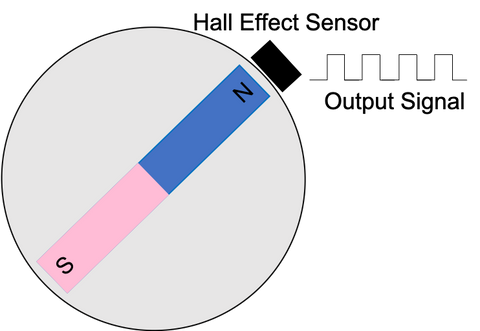
Hall effect sensors operate on a fundamental principle of physics: they detect the presence of a magnetic field and produce a corresponding output voltage. In feedback actuators, these sensors are strategically positioned inside the gearbox alongside a magnetic disc. As the actuator extends or retracts, the disc rotates past the sensor, generating discrete voltage pulses that can be counted and translated into precise positional data.
This tutorial provides a comprehensive guide to implementing hall effect sensor feedback with microcontrollers, covering everything from basic wiring and interrupt configuration to advanced noise filtering and homing procedures. Whether you're building a custom automation system with Arduino or troubleshooting an existing installation, you'll gain the technical knowledge needed to achieve reliable, repeatable positioning.
How Hall Effect Sensors Work in Linear Actuators
Hall effect sensors leverage the Hall effect phenomenon, discovered by physicist Edwin Hall in 1879, where a magnetic field perpendicular to an electric current creates a measurable voltage differential. In practical terms for linear actuators, this means the sensor can detect each time a magnetic pole passes by, creating a digital pulse.
The typical configuration inside an actuator gearbox includes a stationary hall effect sensor mounted to the housing and a multi-pole magnetic disc attached to a rotating gear shaft. As the actuator motor drives the gearbox, the disc rotates, causing alternating magnetic poles (north and south) to pass the sensor. Each pole transition triggers the sensor to output a voltage pulse—typically a 5V digital signal that transitions from LOW to HIGH or vice versa.
The key advantage of this system is its incremental resolution. With magnetic discs containing dozens or even hundreds of pole pairs, a single rotation can generate thousands of countable pulses. When combined with the gear reduction ratio of the actuator, this translates to extremely fine position resolution. For example, a bullet actuator with a 14-inch stroke might generate over 49,000 pulses across its full range of motion.
Incremental vs. Absolute Positioning
It's important to understand that hall effect sensors provide incremental feedback, not absolute position data. Unlike potentiometers that output a voltage proportional to absolute position, hall effect sensors only indicate movement—not where the actuator actually is in space. This means your control system must count pulses from a known reference point (home position) and maintain that count throughout operation.
This incremental nature requires more sophisticated programming but offers significant advantages: immunity to electrical noise that plagues analog potentiometers, higher resolution, and no wear-related drift over millions of cycles. The trade-off is that your controller must implement homing procedures and maintain positional awareness through power cycles.
Wiring Hall Effect Sensors to Microcontrollers
Connecting a hall effect sensor to a microcontroller requires understanding three essential connections: power supply, ground, and signal output. Most hall effect sensors in feedback actuators operate on 5V logic, though some industrial variants may use 12V or 24V signaling.

The wiring configuration typically includes:
- Red wire: Connect to 5V supply (or appropriate voltage for your sensor)
- Black wire: Connect to ground (GND)
- Yellow or white wire: Signal output, connects to a microcontroller interrupt-capable pin
When using an Arduino Uno, pins 2 and 3 support external interrupts, making them ideal for hall effect sensor connections. Other microcontrollers have different interrupt-capable pins—consult your specific board's documentation. The Arduino Mega offers additional interrupt pins (2, 3, 18, 19, 20, 21), providing more flexibility for complex projects involving multiple actuators.
Power Supply Considerations
Ensure your power supply can handle both the microcontroller and actuator loads simultaneously. While the hall effect sensor itself draws minimal current (typically under 10mA), the actuator motor can draw several amperes under load. Use appropriate gauge wiring and consider adding a filtering capacitor (100µF to 470µF) near the power input to smooth voltage fluctuations that might cause false sensor triggers.
Programming Interrupt-Driven Pulse Counting
The cornerstone of hall effect sensor feedback is implementing interrupt service routines (ISRs) that count pulses as they occur. Interrupts allow your microcontroller to respond immediately to sensor signals without constantly polling the input pin, freeing up processing time for other tasks.
Setting Up Interrupts in Arduino
Arduino's attachInterrupt() function configures external interrupts. The basic syntax requires three parameters: the interrupt number, the ISR function name, and the trigger mode. Here's a fundamental setup:
volatile long stepCount = 0;

void setup() {
  pinMode(2, INPUT);
  attachInterrupt(digitalPinToInterrupt(2), countSteps, RISING);
  Serial.begin(9600);
}

void countSteps() {
  stepCount++;
}
The RISING trigger mode activates the interrupt when the signal transitions from LOW to HIGH. Alternative modes include FALLING (HIGH to LOW), CHANGE (any transition), and LOW (while signal is LOW). For hall effect sensors, RISING or FALLING typically work best, as they trigger once per magnetic pole passage rather than twice with CHANGE mode.
Note the volatile keyword before the stepCount variable—this tells the compiler that this variable can change unexpectedly (from outside the normal program flow), preventing optimization that might cause errors in interrupt-driven code.
Writing Effective Interrupt Service Routines
ISRs must be fast and minimal. Avoid time-consuming operations like serial printing, floating-point math, or calling delay(). The ISR should typically only increment or decrement counters, set flags, or capture timestamps. Complex processing should happen in the main loop, triggered by flags set in the ISR.
volatile long stepCount = 0;
volatile bool newDataAvailable = false;

void countSteps() {
  stepCount++;
  newDataAvailable = true;
}

void loop() {
  if (newDataAvailable) {
    // Process the new step count
    processPosition();
    newDataAvailable = false;
  }
}
Converting Pulses to Position Data
Raw pulse counts become meaningful when converted to real-world units like inches, millimeters, or degrees of rotation. This conversion requires knowing the pulses-per-inch (PPI) specification of your specific actuator model.
For example, FIRGELLI's Bullet Series 36 Cal. actuators with 14-inch stroke generate approximately 3,500 pulses per inch of travel. The conversion calculation is straightforward:
float positionInInches = (float)stepCount / 3500.0;
Bidirectional Position Tracking
Since actuators move in both directions, your code must track direction to determine whether to add or subtract pulses from the current position. This requires maintaining a direction variable that updates whenever you command the actuator to extend or retract:
volatile long stepCount = 0;
volatile long currentPosition = 0;
int direction = 0; // 1 for extending, -1 for retracting, 0 for stopped

void updatePosition() {
  if (stepCount > 0) {
    currentPosition += (stepCount * direction);
    stepCount = 0; // Reset pulse counter after updating position
  }
}

void extendActuator() {
  direction = 1;
  // Motor driver code to extend actuator
}

void retractActuator() {
  direction = -1;
  // Motor driver code to retract actuator
}
This approach accumulates pulses in a temporary counter (stepCount) and periodically transfers them to the absolute position variable (currentPosition) based on the current direction. Resetting stepCount after each update prevents double-counting.
Homing Procedures for Accurate Positioning
Because hall effect sensors provide incremental feedback, establishing a known reference position—called homing—is essential for accurate positioning. Without homing, the microcontroller has no way to know the actuator's starting position when power is first applied.
Basic Homing Strategy
The most common homing approach drives the actuator to a mechanical limit (fully retracted or fully extended) where no further movement is possible. When the actuator reaches this limit, pulse generation stops, indicating you've reached the reference position:
void homeActuator() {
  long previousSteps = 0;
  unsigned long previousTime = millis();
  bool homed = false;

  // Start retracting
  direction = -1;
  driveActuator(direction);

  while (!homed) {
    unsigned long currentTime = millis();

    // Check every 100ms if actuator is still moving
    if (currentTime - previousTime >= 100) {
      if (stepCount == previousSteps) {
        // No new pulses detected - we've reached the limit
        stopActuator();
        currentPosition = 0; // Set home position to zero
        stepCount = 0;
        homed = true;
      } else {
        previousSteps = stepCount;
        previousTime = currentTime;
      }
    }
  }
}
This routine monitors whether new pulses are being generated. When pulse generation stops for a defined period (100ms in this example), the code concludes the actuator has reached its mechanical limit and sets that position as zero.
Advanced Homing with Limit Switches
For applications requiring mid-stroke reference positions or additional safety, external limit switches provide precise homing points without relying on mechanical limits. These switches can be wired to separate interrupt pins or monitored as digital inputs. Using limit switches also reduces mechanical stress on the actuator by preventing it from stalling against internal stops during every homing sequence.
Filtering Electrical Noise and False Triggers
While hall effect sensors are more noise-resistant than analog potentiometers, electrical interference from motor PWM signals, power supply fluctuations, and electromagnetic interference can still cause false triggers. These phantom pulses accumulate over time, causing position drift that degrades accuracy.
Time-Based Debouncing
The most effective software solution implements a minimum time delay between valid pulses. Since the actuator's speed determines pulse frequency, you can calculate the expected time between consecutive pulses and reject any triggers that occur too quickly:
volatile long stepCount = 0;
volatile unsigned long lastTriggerTime = 0;
const unsigned long triggerDelay = 500; // Microseconds between valid pulses

void countSteps() {
  unsigned long currentTime = micros();

  if (currentTime - lastTriggerTime >= triggerDelay) {
    stepCount++;
    lastTriggerTime = currentTime;
  }
}
The appropriate triggerDelay value depends on your actuator's speed and gear ratio. For a bullet actuator moving at 1 inch per second with 3,500 PPI, pulses arrive approximately every 286 microseconds. Setting triggerDelay to 200-250 microseconds provides noise filtering while ensuring legitimate pulses aren't rejected.
Calculating Optimal Debounce Times
To determine the precise debounce delay for your application:
- Calculate maximum actuator speed in inches per second
- Multiply by pulses per inch to get pulses per second
- Convert to microseconds between pulses: 1,000,000 / pulses per second
- Set debounce delay to 70-80% of this value for safety margin
For variable-speed applications, implement adaptive debouncing that adjusts the delay based on current commanded speed, or use a conservative (shorter) delay that works across the full speed range.
Hardware Filtering Solutions
Complement software debouncing with hardware noise reduction:
- Add a 0.1µF ceramic capacitor between the sensor signal line and ground at the microcontroller
- Use shielded cable for sensor wiring in electrically noisy environments
- Separate high-current motor wiring from low-voltage sensor wiring
- Implement proper grounding with star-ground topology to minimize ground loops
- Consider using twisted-pair wire for the sensor signal if running long distances
Position Correction Strategies
Even with careful noise filtering, accumulated errors can occur over thousands of movement cycles. Implementing periodic position correction ensures long-term accuracy without constant manual recalibration.
Automatic Correction at Limits
The simplest correction strategy resets position when the actuator reaches known limits. When you detect the actuator has stalled at full extension or retraction, set the position to the known value:
void correctPosition() {
  long previousPosition = currentPosition;
  unsigned long previousTime = millis();

  // Wait to see if position is still changing
  delay(100);

  if (currentPosition == previousPosition) {
    // Actuator has stopped moving
    if (direction == 1) {
      // Extending - must be at full extension
      currentPosition = maxStroke * pulsesPerInch;
    } else if (direction == -1) {
      // Retracting - must be at full retraction
      currentPosition = 0;
    }
    stepCount = 0;
  }
}
This approach works particularly well for applications that regularly cycle through the full stroke range, such as TV lifts that fully extend and retract with each use.
Periodic Rehoming
For critical applications requiring absolute accuracy, schedule periodic rehoming sequences during idle periods or at application startup. This completely resets position tracking and eliminates any accumulated error. Industrial automation systems often perform homing cycles at the start of each shift or after extended idle periods.
Synchronizing Multiple Actuators
Hall effect feedback enables precise synchronization of multiple actuators—critical for applications like adjustable desks, large doors, or camera sliders where misalignment causes binding or uneven loads. The high resolution of pulse counting allows synchronized positioning within fractions of an inch.
Basic synchronization compares position values from multiple actuators and adjusts speeds to minimize position error:
long actuator1Position = 0;
long actuator2Position = 0;
const long syncTolerance = 50; // Pulses (about 0.014" with 3500 PPI)

void synchronizeActuators() {
  long positionError = actuator1Position - actuator2Position;

  if (abs(positionError) > syncTolerance) {
    if (positionError > 0) {
      // Actuator 1 is ahead, slow it down or speed up actuator 2
      adjustSpeed(1, -5); // Reduce actuator 1 speed by 5%
      adjustSpeed(2, 5);  // Increase actuator 2 speed by 5%
    } else {
      // Actuator 2 is ahead
      adjustSpeed(1, 5);
      adjustSpeed(2, -5);
    }
  }
}
For advanced synchronization without custom programming, FIRGELLI's FA-SYNC-X controller automatically maintains synchronization across multiple feedback actuators, compensating for load differences and ensuring precise parallel movement regardless of external forces.
Complete Implementation Example
Below is a comprehensive Arduino sketch demonstrating hall effect feedback implementation for a 14-inch stroke Bullet Series 36 Cal. actuator. This code incorporates interrupt-based counting, debouncing, homing, and position correction:
// Pin definitions
#define HALL_SENSOR_PIN 2
#define MOTOR_PWM_PIN 9
#define MOTOR_DIR_PIN 8

// Actuator specifications
const float pulsesPerInch = 3500.0;
const float strokeLength = 14.0;
const long maxPosition = strokeLength * pulsesPerInch;

// Position tracking variables
volatile long stepCount = 0;
volatile unsigned long lastTriggerTime = 0;
const unsigned long triggerDelay = 250; // Microseconds
long currentPosition = 0;
int direction = 0; // 1 = extending, -1 = retracting, 0 = stopped

// Control variables
bool isHomed = false;

void setup() {
  Serial.begin(9600);
  pinMode(HALL_SENSOR_PIN, INPUT);
  pinMode(MOTOR_PWM_PIN, OUTPUT);
  pinMode(MOTOR_DIR_PIN, OUTPUT);

  // Attach interrupt for hall effect sensor
  attachInterrupt(digitalPinToInterrupt(HALL_SENSOR_PIN), countSteps, RISING);

  // Perform homing sequence
  homeActuator();
  Serial.println("System ready");
}

void loop() {
  updatePosition();

  // Example: Move to 7 inches (mid-stroke)
  moveToPosition(7.0);
  delay(5000);

  // Return home
  moveToPosition(0);
  delay(5000);
}

void countSteps() {
  unsigned long currentTime = micros();

  // Debounce filter
  if (currentTime - lastTriggerTime >= triggerDelay) {
    stepCount++;
    lastTriggerTime = currentTime;
  }
}

void updatePosition() {
  if (stepCount > 0) {
    noInterrupts();
    long stepsToAdd = stepCount;
    stepCount = 0;
    interrupts();

    currentPosition += (stepsToAdd * direction);

    // Constrain position to valid range
    currentPosition = constrain(currentPosition, 0, maxPosition);
  }
}

void moveToPosition(float targetInches) {
  long targetPosition = targetInches * pulsesPerInch;
  const long positionTolerance = 35; // About 0.01 inches

  while (abs(currentPosition - targetPosition) > positionTolerance) {
    updatePosition();

    if (currentPosition < targetPosition) {
      extendActuator();
    } else {
      retractActuator();
    }

    delay(10);
  }

  stopActuator();
  Serial.print("Position reached: ");
  Serial.print(currentPosition / pulsesPerInch);
  Serial.println(" inches");
}

void homeActuator() {
  Serial.println("Homing actuator...");
  long previousSteps = 0;
  unsigned long previousTime = millis();
  int stallCount = 0;

  direction = -1;
  retractActuator();

  while (stallCount < 3) {
    unsigned long currentTime = millis();

    if (currentTime - previousTime >= 100) {
      if (stepCount == previousSteps) {
        stallCount++;
      } else {
        stallCount = 0;
        previousSteps = stepCount;
      }
      previousTime = currentTime;
    }
  }

  stopActuator();
  currentPosition = 0;
  stepCount = 0;
  isHomed = true;
  Serial.println("Homing complete");
}

void extendActuator() {
  direction = 1;
  digitalWrite(MOTOR_DIR_PIN, HIGH);
  analogWrite(MOTOR_PWM_PIN, 255);
}

void retractActuator() {
  direction = -1;
  digitalWrite(MOTOR_DIR_PIN, LOW);
  analogWrite(MOTOR_PWM_PIN, 255);
}

void stopActuator() {
  direction = 0;
  analogWrite(MOTOR_PWM_PIN, 0);
}
This implementation provides a solid foundation for most DIY automation projects. Adjust the pulsesPerInch value to match your specific actuator model, and modify the motor control pins and logic to match your motor driver configuration.
Advantages Over Potentiometer Feedback
Hall effect sensors offer several compelling advantages compared to traditional potentiometer-based feedback systems commonly found in entry-level linear actuators:
Superior Resolution
With 3,500+ pulses per inch versus the typical 10-bit (1,024 step) resolution of analog-to-digital converters reading potentiometers, hall effect sensors provide more than three times the positional accuracy per inch of stroke. This becomes increasingly significant with longer stroke lengths where potentiometer resolution degrades proportionally.
Immunity to Electrical Noise
Digital pulse signals are inherently more noise-resistant than the analog voltage signals from potentiometers. Motor PWM switching, power supply ripple, and electromagnetic interference that corrupt potentiometer readings have minimal impact on properly debounced digital pulse counting.
No Wear-Related Drift
Potentiometers are mechanical contact devices that wear over time, developing dead spots and resistance changes that cause position drift. Hall effect sensors are non-contact devices with no wearing parts, maintaining accuracy over millions of cycles without calibration.
Better Multi-Actuator Synchronization
The discrete nature of pulse counting enables tighter synchronization between multiple actuators compared to comparing analog voltage levels. This makes hall effect feedback ideal for applications like TV lifts or adjustable desks where multiple actuators must move in precise unison.
Troubleshooting Common Issues
No Pulses Detected
If your interrupt never triggers:
- Verify the sensor has proper power (5V) and ground connections
- Confirm the signal wire is connected to an interrupt-capable pin
- Check that the actuator is actually moving (motor receiving power)
- Use a multimeter or oscilloscope to verify the sensor is outputting pulses
- Ensure
attachInterrupt()is called in setup() before any movement commands
Position Drift Over Time
If position gradually becomes inaccurate:
- Implement or shorten the debounce delay to filter noise
- Add hardware filtering capacitors
- Implement position correction at known limits
- Schedule periodic rehoming during operation
- Check for loose electrical connections causing intermittent contact
Erratic Pulse Counting
If step counts vary wildly or trigger randomly:
- Increase the debounce delay value
- Separate motor power wiring from sensor wiring
- Add a 0.1µF capacitor across sensor signal and ground
- Use shielded cable for sensor wiring
- Verify your power supply provides clean, stable voltage
Conclusion
Hall effect sensor feedback represents a significant advancement in linear actuator position control, providing the precision and reliability required for demanding automation applications. By implementing proper interrupt handling, noise filtering, and homing procedures, you can achieve positioning accuracy measured in thousandths of an inch—resolution impossible with traditional potentiometer feedback.
The techniques covered in this guide—from basic interrupt configuration to advanced synchronization strategies—provide a complete foundation for integrating feedback actuators into your projects. Whether you're building a custom TV lift, robotics platform, or industrial automation system, hall effect sensors deliver the performance needed for professional-grade results.
For those preferring turnkey solutions, FIRGELLI's FA-SYNC-X controller eliminates the complexity of custom programming while providing advanced features like automatic synchronization and load compensation. However, understanding the underlying principles empowers you to diagnose issues, optimize performance, and push the boundaries of what's possible with precision motion control.
Frequently Asked Questions
What does pulses per inch (PPI) mean for hall effect sensors?
Pulses per inch refers to the number of discrete voltage pulses the hall effect sensor generates for each inch of linear actuator travel. Higher PPI values indicate finer resolution—for example, 3,500 PPI means the sensor outputs 3,500 distinct pulses as the actuator moves one inch. This specification determines the theoretical positioning accuracy of your system. A 14-inch stroke actuator with 3,500 PPI generates approximately 49,000 total pulses across its full range, allowing positioning precision to within approximately 0.0003 inches theoretically, though practical accuracy is typically limited to 0.01-0.02 inches due to mechanical backlash and control system limitations.
Can I use any pin on my Arduino for hall effect sensor feedback?
No, you must use interrupt-capable pins for reliable pulse counting. On an Arduino Uno, only pins 2 and 3 support external interrupts. The Arduino Mega offers additional interrupt pins (2, 3, 18, 19, 20, 21). While technically you could poll a regular digital pin in your main loop, this approach will miss pulses when the microcontroller is busy with other tasks, causing significant position errors. External interrupts allow the processor to respond immediately to each pulse regardless of what else is happening in your code, ensuring accurate counting even during complex calculations or serial communication.
How often should I perform homing procedures?
For most applications, homing once at system startup provides sufficient accuracy. However, critical applications or systems experiencing significant vibration, shock loads, or operating for extended periods should implement periodic rehoming. Consider rehoming daily for industrial systems, after any unexpected power loss, or whenever position accuracy becomes questionable. Applications that regularly cycle through full extension or retraction can implement automatic position correction at limits without full rehoming sequences, providing continuous accuracy verification without dedicated homing cycles. Monitor position error accumulation in your specific application to determine optimal homing frequency.
Do hall effect sensors work with variable speed actuators?
Yes, hall effect sensors work across the full speed range of variable speed actuators, though pulse frequency varies with speed. Slower speeds generate pulses less frequently, while maximum speed produces the highest pulse rate. Your debounce filtering must accommodate this range—set the debounce delay based on maximum expected speed (shortest time between pulses) to avoid filtering out legitimate pulses at high speeds. If your application varies speed significantly during operation, implement adaptive debouncing that adjusts filter timing based on current commanded speed, or use a conservative delay that works across the entire speed range while still filtering high-frequency noise.
What happens to position tracking after a power loss?
Hall effect sensors provide incremental feedback, not absolute position measurement, so position information is lost when power is removed. Upon restart, your microcontroller has no way to determine where the actuator is positioned without performing a homing sequence. This is the primary trade-off of incremental feedback systems. If maintaining position through power cycles is critical, you must implement non-


