The Hidden Health Crisis in Modern Workplaces
Your office chair may be the most dangerous piece of equipment you use all day. While we obsess over ergonomic keyboards and monitor heights, decades of research have revealed a sobering truth: prolonged sitting is fundamentally incompatible with human physiology. The average office worker spends 8-12 hours seated daily, a behavior pattern that our bodies simply weren't designed to sustain.
🎥 Video — The Terrifying Ways Traditional Desks Are Destroying Your Body and Why Sit/Stand Desks Are a Must
The statistics are alarming. Studies consistently demonstrate that sitting for extended periods increases mortality risk by 12-40% depending on duration, with sedentary behavior contributing to approximately 3.2 million deaths annually worldwide. But this isn't just about mortality—chronic sitting triggers a cascade of metabolic, cardiovascular, and musculoskeletal problems that diminish quality of life long before they become life-threatening.
The solution isn't abandoning sitting entirely or committing to a full standing desk setup. Modern adjustable standing desk systems powered by precision linear actuators offer a practical middle ground—seamless transitions between sitting and standing positions throughout your workday. Understanding exactly what sitting does to your body, and how electric height-adjustable desks can mitigate these risks, is essential for anyone spending significant time at a desk.
How Prolonged Sitting Damages Your Body
Metabolic Shutdown and Premature Mortality
When you sit for extended periods, your body initiates what researchers call "metabolic shutdown." Large muscle groups in your legs and core remain inactive, dramatically reducing caloric expenditure and triggering a cascade of physiological changes. Blood flow decreases, enzyme production drops, and your body's ability to regulate blood sugar and break down fat becomes impaired.
The mortality statistics are particularly striking. Research published in major medical journals shows that individuals sitting 8 hours daily face a 12% increased risk of premature death compared to those sitting 4 hours or less. This risk escalates dramatically to 40% for those exceeding 11 hours of daily sitting. What makes these numbers particularly troubling is that they persist even among individuals who exercise regularly—you cannot simply "cancel out" the effects of prolonged sitting with a gym session.
The mechanisms behind this increased mortality risk are multifaceted. Prolonged sitting contributes to cardiovascular disease, metabolic syndrome, certain cancers, and musculoskeletal deterioration. The cumulative effect of these risk factors, compounded over years of sedentary work, creates a significant health burden that many office workers unknowingly carry.
Cardiovascular and Metabolic Disease Risk
The cardiovascular consequences of chronic sitting are well-documented and deeply concerning. When major muscle groups remain inactive, your body's ability to regulate blood pressure and cholesterol levels deteriorates. Blood pools in the lower extremities, forcing your heart to work harder to maintain circulation. Over time, this leads to increased blood pressure and elevated "bad" LDL cholesterol levels.
Perhaps most alarmingly, individuals who sit for prolonged periods are more than twice as likely to develop cardiovascular disease compared to those who sit less frequently. This doubled risk persists across different populations and age groups, making it one of the most consistent findings in occupational health research.
Type 2 diabetes risk follows a similar pattern. When you sit, your muscles require less glucose from the bloodstream, leading to decreased insulin sensitivity. Your pancreas must produce more insulin to achieve the same blood sugar regulation, eventually leading to insulin resistance—the hallmark of type 2 diabetes. Studies show that breaking up sitting time with standing or movement periods helps maintain healthy glucose metabolism and reduces diabetes risk by up to 30%.

Musculoskeletal Deterioration
Beyond metabolic effects, prolonged sitting causes direct structural damage to your musculoskeletal system. Your hip flexors remain shortened for hours, eventually losing flexibility and contributing to lower back pain. Core muscles disengage, losing strength and allowing your spine to compress under poor posture. Shoulders round forward, neck muscles strain to support your head, and thoracic spine mobility decreases.
The compressive forces on spinal discs during sitting exceed those experienced while standing by approximately 40%. Over years, this sustained pressure accelerates disc degeneration and increases herniation risk. Meanwhile, glute muscles—critical for posture, balance, and power generation—atrophy from disuse, a condition colloquially termed "dead butt syndrome" that has real functional consequences.
Poor circulation from sitting also affects tissue health throughout your body. Reduced blood flow means less oxygen and nutrients reach muscles, tendons, and ligaments, slowing recovery from micro-injuries and increasing injury susceptibility when you do become active.
Cognitive and Mental Health Impacts
The effects of prolonged sitting extend beyond physical health to cognitive function and mental well-being. When you sit for extended periods, reduced blood flow affects not just your legs and core, but also your brain. Studies using functional MRI have shown decreased blood flow to brain regions responsible for memory formation, attention, and executive function during prolonged sitting.
Office workers frequently report afternoon energy crashes, difficulty concentrating, and mental fatigue—symptoms directly linked to sustained sedentary behavior. Research demonstrates that breaking up sitting time with standing or light movement periods improves alertness, concentration, and cognitive performance. One workplace study found that employees using height-adjustable desks reported 10% increases in productivity and concentration compared to those using traditional fixed-height desks.
Mental health correlations are equally significant. Multiple studies have linked excessive sitting time with increased rates of anxiety and depression. While the mechanisms aren't fully understood, theories include reduced endorphin production from inactivity, decreased social interaction in seated positions, and metabolic factors affecting neurotransmitter balance.
How Sit-Stand Desks Mitigate Health Risks
The Physiology of Standing
Standing activates large muscle groups in your legs, core, and back that remain dormant while sitting. This muscle activation increases energy expenditure by 10-20% compared to sitting—not dramatic enough to replace exercise, but significant when accumulated over an 8-hour workday. More importantly, standing maintains blood flow, prevents metabolic shutdown, and keeps your body in an active state even during desk work.
Standing also improves spinal alignment. Your vertebrae stack more naturally, reducing compression on intervertebral discs. Core muscles engage to maintain posture, preventing the collapsed, rounded position common during sitting. Hip flexors remain extended, preventing the shortening that contributes to lower back pain and reduced mobility.
However, standing all day presents its own problems—foot fatigue, varicose veins, and joint stress. This is precisely why adjustable sit-stand desks represent the optimal solution: they enable position variation throughout the day, allowing you to capture the benefits of standing while avoiding the drawbacks of sustained static positions.
Optimal Sitting-Standing Ratios
Research on optimal sit-stand ratios suggests that 1:1 or 1:3 standing-to-sitting ratios provide the best health outcomes. In practical terms, this means standing for 15-30 minutes for every hour of sitting, or alternating between positions every 30-60 minutes. The key is regular position change rather than prolonged periods in either stance.
Many users find success with task-based transitions: standing during phone calls, video conferences, or reading tasks, while sitting during intensive typing, detailed design work, or tasks requiring fine motor control. This approach integrates naturally into workflow without requiring constant attention to timing.
Modern electric sit-stand desks make these transitions effortless. Quality systems use powerful industrial actuators capable of lifting 200+ pounds with smooth, quiet operation. Programmable height presets via a control box allow instant transitions to your preferred sitting and standing heights with a single button press, eliminating friction from position changes.
Documented Health Improvements
Workplace studies on sit-stand desk adoption have documented numerous health improvements. Users consistently report reduced back and neck pain, with some studies showing 30-50% reductions in discomfort after just 4-6 weeks of use. Blood sugar regulation improves significantly—one study found that standing for 3 hours after lunch reduced blood sugar spikes by 43% compared to remaining seated.
Cardiovascular markers also improve. Regular standing throughout the day increases heart rate by 8-10 beats per minute on average, improving circulation and reducing the cardiovascular strain associated with prolonged sitting. Over weeks and months, this translates to measurable improvements in blood pressure and cholesterol levels.
Energy levels and mood show improvement as well. The majority of sit-stand desk users report feeling more energized throughout the workday, with reduced afternoon fatigue. Self-reported stress levels decrease, likely due to improved circulation, reduced pain, and the sense of control over one's working position.
Engineering and Mechanics of Electric Sit-Stand Desks
Linear Actuator Technology
Modern electric sit-stand desks rely on precision linear actuators for smooth, reliable height adjustment. These electromechanical devices convert rotational motion from an electric motor into linear motion, extending and retracting to raise or lower the desk surface. Quality actuators designed for desk applications typically provide:
- Stroke lengths of 16-24 inches to accommodate the full range from seated to standing heights
- Load capacities of 150-300 pounds per actuator, with dual-actuator systems supporting 300-600 pounds total
- Speed of approximately 1-1.5 inches per second for transitions that take 15-30 seconds
- Duty cycle ratings allowing multiple transitions per hour without overheating
- Quiet operation typically under 50 decibels, quieter than normal conversation
Advanced systems incorporate feedback actuators with built-in position sensing, enabling precise height control and programmable presets. These systems use hall effect sensors or potentiometers to provide real-time position feedback to the control system, ensuring both actuators in a dual-actuator setup remain perfectly synchronized.
Control Systems and Features
The control system represents the brain of an electric sit-stand desk. A quality control box manages power distribution to actuators, processes user inputs from the control panel, stores height presets, and implements safety features like anti-collision detection.
Modern control panels offer memory presets—typically 2-4 programmable positions—allowing instant recall of preferred heights. More advanced systems include Bluetooth connectivity for smartphone control, sit-stand reminders, and usage tracking to help users maintain healthy position-change habits.
Safety features are critical in quality systems. Anti-collision sensors detect unexpected resistance during movement and immediately stop or reverse the desk motion, preventing damage to equipment or injury. Overload protection prevents operation when weight exceeds safe limits, and thermal protection prevents motor damage from excessive use.
Mechanical Frame Design
The mechanical frame must provide stability across the full height range while remaining compact when lowered. Quality designs employ telescoping columns with three or four nested sections, using precision slide rails or linear guides for smooth extension with minimal lateral play.
Frame stability is paramount—a wobbly desk is unusable for precision work. Engineering considerations include:
- Wide base footprint for low center of gravity
- Rigid column construction using heavy-gauge steel
- Cross-bracing between legs on some designs
- Quality linear bearings and guides to prevent column deflection
The best frames maintain rock-solid stability even at maximum height with full load, with lateral movement under 2-3mm when subjected to typing forces.
Selecting and Implementing a Sit-Stand Desk System
Key Selection Criteria
When selecting a sit-stand desk system, several specifications determine performance and longevity:
Height range: Ensure the desk accommodates your sitting and standing heights. Measure from floor to elbow height while standing in shoes—this should fall within the desk's height range. Most quality desks offer 22-48 inch height ranges, suitable for users from 5'0" to 6'5".
Load capacity: Calculate total weight including desktop, monitors, computer equipment, and accessories. Add 20-30% margin and ensure this falls within the desk's rated capacity. Dual-monitor setups with desktop computers may require 200+ pound capacity systems.
Desktop dimensions: Consider both width and depth. 48-60 inch widths accommodate most setups, while 30-inch depth provides adequate monitor distance and workspace. L-shaped configurations require specialized frames or dual-motor systems.
Speed and noise: Faster isn't always better—1-1.5 inches per second provides smooth transitions without feeling rushed. Noise levels under 50 decibels ensure office-appropriate operation.
Power requirements: Most systems require standard 120V AC power. Check that your power supply provides adequate amperage for simultaneous actuator operation.
Installation Considerations
Professional installation ensures optimal performance and longevity, but many systems are designed for DIY assembly. Key installation steps include:
- Frame assembly: Follow manufacturer specifications for leg spacing and cross-member installation. Ensure all fasteners are properly torqued to prevent loosening under cyclic loading.
- Desktop attachment: Use appropriate mounting brackets for your desktop material. Solid wood and plywood accept screws directly; glass, laminate, or thin materials may require specialized mounting solutions.
- Cable management: Plan cable routing before first use. Quality desks include cable trays or channels to prevent cables from snagging during height transitions.
- Control panel placement: Mount the control panel within easy reach but positioned to avoid accidental activation. Some users prefer edge-mounting, others under-desk mounting.
- Stability verification: Test stability at all heights and load conditions before regular use. Address any wobble or instability before adding expensive equipment.
Ergonomic Setup Optimization
Proper ergonomic setup maximizes the health benefits of your sit-stand desk:
Monitor height: Top of screen should align with eye level or slightly below. This may require monitor arms or stands to maintain proper height in both sitting and standing positions.
Keyboard and mouse position: Elbows should rest at 90-100 degrees with forearms parallel to floor. Wrists remain neutral, not bent up or down. This position should be achievable in both sitting and standing configurations.
Standing posture: Weight should distribute evenly across both feet, positioned hip-width apart. Knees remain soft, not locked. Core engages lightly to maintain upright posture. Consider an anti-fatigue mat to reduce foot and leg strain.
Sitting posture: Chair height should allow feet flat on floor with thighs parallel to ground. Lower back supported by chair lumbar support. Avoid perching on chair edge—use full seat depth.
Beyond Standing: Comprehensive Ergonomic Solutions
Movement Integration
While sit-stand desks dramatically improve workplace ergonomics, they represent one component of a comprehensive approach to occupational health. The ultimate goal is regular movement and position variation throughout the workday.
Consider integrating:
- Walking breaks: 2-3 minute walks every 30-60 minutes maintain circulation and mental acuity
- Stretching routines: Brief stretching sessions targeting hip flexors, shoulders, and neck reduce tension accumulation
- Balance board or wobble cushion: Subtle movements while standing engage stabilizer muscles and prevent static standing
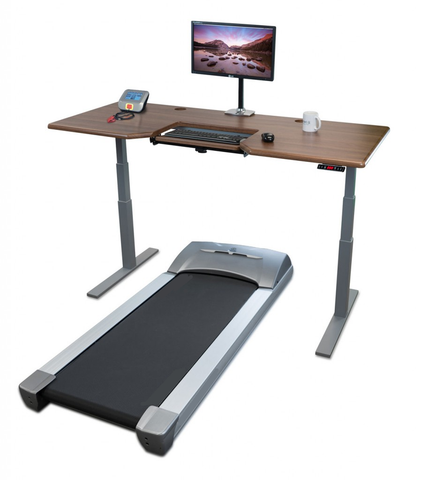
- Treadmill or bike integration: Some users incorporate under-desk treadmills or cycles for movement during low-concentration tasks
Workspace Accessories
Additional ergonomic accessories complement your sit-stand desk:
Monitor arms: Adjustable arms allow quick repositioning between sitting and standing heights without compromising desk surface area.
Keyboard trays: Some users prefer dedicated keyboard trays that adjust independently from the desk surface, though quality sit-stand desks often eliminate this need.
Cable management: Proper cable organization prevents tangling and damage during height transitions. Cable chains, under-desk trays, or velcro ties keep cables organized.
Anti-fatigue mats: Cushioned mats reduce foot and leg fatigue during standing periods. Choose mats thick enough for cushioning but stable enough to prevent tripping hazards.
The Engineering Advantage: FIRGELLI Approach
FIRGELLI Automations brings decades of motion control expertise to sit-stand desk solutions. Our engineering background—rooted in automotive and aerospace applications where reliability is non-negotiable—informs every aspect of our actuator designs.
Our linear actuators for sit-stand applications undergo rigorous testing for duty cycle, load capacity, and environmental resilience. We offer complete desk lift systems with synchronized dual-actuator setups, programmable controllers, and all necessary mounting hardware. For custom applications or DIY builders, individual actuators and control systems are available with full technical specifications and integration support.
The transition from hydraulic to electric actuation—a shift we've championed across multiple industries—proves particularly beneficial in desk applications. Electric systems offer precise position control, programmable presets, silent operation, and zero maintenance compared to hydraulic alternatives. Our feedback-equipped actuators enable advanced features like automatic collision detection and position memory that would be impossible with hydraulic systems.
Conclusion: Taking Action for Long-Term Health
The evidence is clear and compelling: traditional fixed-height desks contribute to a constellation of serious health problems, from cardiovascular disease and diabetes to musculoskeletal deterioration and cognitive decline. The cumulative effects of 8-12 hours of daily sitting over years or decades create health burdens that cannot be offset by exercise alone.
Electric sit-stand desks powered by reliable linear actuators offer a practical, proven solution. They don't require committing to standing all day or making dramatic workspace changes. Instead, they enable the position variation and regular movement that your body requires for optimal health and performance. The documented benefits—reduced pain, improved cardiovascular markers, better blood sugar regulation, and enhanced cognitive function—begin appearing within weeks of consistent use.
For office workers, remote professionals, and anyone spending significant time at a desk, investing in quality height-adjustable furniture represents one of the most impactful health decisions you can make. Your body will thank you—not just today, but decades from now.
Frequently Asked Questions
How often should I change positions between sitting and standing?
Research suggests changing positions every 30-60 minutes for optimal health benefits. A practical approach is the 1:1 or 1:3 standing-to-sitting ratio—stand for 15-30 minutes for every hour of sitting. However, listen to your body during the adjustment period. If you're new to standing while working, start with shorter standing intervals (10-15 minutes) and gradually increase duration as your muscles adapt. Many modern desk control systems include timers or smartphone apps that remind you to change positions throughout the day.
Will standing while working affect my productivity?
Studies consistently show that sit-stand desk users experience productivity increases rather than decreases. Research has documented 10-15% improvements in concentration, alertness, and task completion rates. The key is proper ergonomic setup in both positions and allowing an adjustment period. Some tasks—particularly those requiring fine motor control or intensive focus—may feel more comfortable while seated initially. Most users develop preferences for certain task types in each position, naturally optimizing their workflow. The cognitive benefits from improved circulation and reduced fatigue typically outweigh any initial adjustment challenges.
What weight capacity do I need for my sit-stand desk?
Calculate total weight including your desktop, monitors, computers, and accessories, then add a 20-30% safety margin. A typical dual-monitor setup with desktop computer weighs 60-100 pounds; adding a solid wood desktop (30-50 pounds) brings total weight to 90-150 pounds. In this scenario, a desk rated for 200+ pounds provides adequate capacity. For heavier setups—three monitors, multiple computers, or exceptionally thick desktops—look for systems rated at 300+ pounds. Quality industrial actuators in dual-motor configurations easily handle these loads while maintaining smooth operation and long-term reliability.
How much electricity does an electric sit-stand desk use?
Electric sit-stand desks are remarkably energy-efficient. Most systems draw 150-350 watts during height adjustment (typically 15-30 seconds per transition) and consume zero power when stationary. Assuming 10 height changes daily, annual electricity consumption is approximately 1-2 kWh, costing less than $0.50 per year in most regions. The motors and control systems only draw current during active movement, unlike devices that maintain standby power consumption. This minimal energy use makes electric actuator systems far more efficient than hydraulic alternatives while providing superior control and features.
Can I build my own sit-stand desk with individual components?
Absolutely. DIY sit-stand desk projects are popular among makers and those wanting custom sizing or features. Key components include two synchronized linear actuators (typically 16-24 inch stroke length), a dual-actuator control box with synchronization capability, mounting brackets, and appropriate power supplies. Feedback actuators with position sensing enable advanced features like memory presets and anti-collision. The mechanical frame can be fabricated from steel tubing or purchased as a kit. Many builders use Arduino or similar microcontrollers for custom control logic. FIRGELLI provides detailed technical specifications and integration support for custom applications, making DIY builds achievable even for hobbyists with basic electrical and mechanical skills.
How do I maintain and troubleshoot my electric sit-stand desk?
Electric sit-stand desks require minimal maintenance. Key practices include: keeping the telescoping columns clean and free from dust accumulation (wipe monthly with a dry cloth), ensuring all mounting hardware remains tight (check every 3-6 months), and verifying cable management prevents snags during movement. Most quality systems are sealed and require no lubrication. If you experience uneven movement between legs, re-synchronize the actuators using the controller's reset function (consult your manual). Intermittent operation or complete failure to move often indicates loose power connections or overload conditions—verify all cables are secure and reduce load if necessary. Unusual noises during operation may indicate mechanical binding or debris in the columns. Most issues resolve with basic inspection and cleaning; contact manufacturer support for persistent problems or electrical faults.


