Transforming Your Home Office with Electric Linear Actuators
The shift toward remote and hybrid work has fundamentally changed how we think about home office design. What was once a makeshift workspace at the kitchen table has evolved into a sophisticated environment where productivity, ergonomics, and automation converge. As more professionals spend 40+ hours per week in their home offices, the demand for intelligent, adaptable workspace solutions has never been higher.
🎥 Video — Linear Actuators in Home Office Automation
Electric linear actuators are at the heart of this home office revolution. These precision motion control devices enable everything from height-adjustable desks to concealed monitor lifts, transforming static furniture into dynamic systems that adapt to your needs throughout the workday. Unlike pneumatic or hydraulic alternatives, electric actuators offer quiet operation, precise positioning, and programmable control—essential features for a professional home environment. Whether you're optimizing ergonomics, maximizing limited square footage, or creating a multipurpose space that transitions from office to living area, actuator-based automation provides practical solutions that enhance both comfort and efficiency.
This comprehensive guide explores how linear actuators are being deployed in modern home offices, from the ubiquitous sit-stand desk to creative custom applications. We'll examine the technical considerations, health benefits, and design possibilities that make actuator-driven automation an investment in your long-term productivity and wellbeing.
Sit-Stand Desks: The Foundation of Ergonomic Home Offices

The height-adjustable standing desk has become the cornerstone of home office ergonomics, and for good reason. Research published in Preventing Chronic Disease demonstrates that reducing occupational sitting time leads to measurable improvements in worker health, including reduced upper back and neck pain, improved mood states, and decreased fatigue levels. The Mayo Clinic has extensively documented the cardiovascular and metabolic risks associated with prolonged sitting, making the case for postural variation throughout the workday compelling from both a health and productivity standpoint.
How Linear Actuators Power Sit-Stand Desks
Electric sit-stand desks rely on specialized column lift actuators engineered specifically for vertical lifting applications. Unlike standard rod-style actuators, lifting columns are designed to handle the unique mechanical stresses of desk applications—particularly off-center loading and lateral forces that occur when objects are placed asymmetrically on the work surface. These columns typically feature:
- Telescoping tube design: Multiple nested sections that extend smoothly while maintaining structural rigidity throughout the stroke range
- Integrated motor and drive system: Compact design that eliminates external components and simplifies installation
- Load capacity of 100-350 lbs per column: Sufficient for standard office equipment, monitors, and work materials
- Stroke lengths from 10 to 24 inches: Accommodating users from 5' to 6'5" in height with proper ergonomic positioning
- Synchronization capability: When using multiple columns, electronic controllers ensure simultaneous movement and prevent racking
A typical dual-column desk configuration uses two lifting actuators positioned at opposing corners, controlled by a single control box that maintains synchronized movement. More robust four-column systems distribute weight more evenly and can support heavier loads such as multiple monitor arrays, reference materials, or specialized equipment. The choice between two and four columns depends on desk dimensions, anticipated load, and budget considerations.
Health and Productivity Benefits
The peer-reviewed evidence for sit-stand desks extends beyond simple calorie expenditure. The Take-a-Stand Project found that workers using height-adjustable desks reported 54% reduction in upper back and neck pain after just four weeks, with 65% reporting improved productivity. The key is postural variation—alternating between sitting and standing positions throughout the day rather than remaining static in either position.
Optimal usage patterns typically involve standing for 15-30 minute intervals every hour, though individual preferences vary. Modern desks with memory presets and remote control systems make these transitions effortless, encouraging more frequent position changes. For video presentations and virtual meetings, the ability to adjust height on-the-fly allows you to optimize camera angles and project confidence—a subtle but meaningful advantage in remote work environments.
Concealed Monitor Lifts and Pop-Up Displays
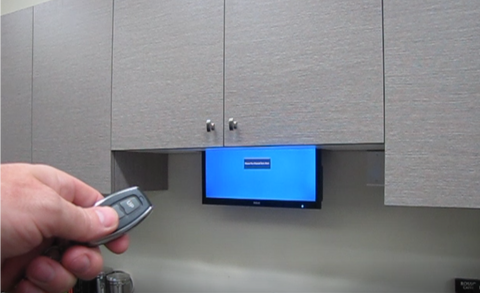
Space optimization becomes critical in home offices where the workspace must coexist with living areas. Concealed monitor lifts offer an elegant solution, allowing displays to disappear into desks, cabinets, or ceiling cavities when not in use. This approach serves multiple purposes: reclaiming valuable desk real estate, creating a cleaner aesthetic for video calls, and enabling rooms to serve dual purposes—transforming from a professional office to a dining room or guest space in seconds.
Types of Monitor Lift Configurations
Monitor lift mechanisms vary based on display size, installation location, and motion requirements. The three primary configurations are:
Pop-up lifts are installed within desks or credenzas, with the monitor rising vertically from a concealed compartment. These systems work well for displays up to 32 inches and typically use tv lift mechanisms with stroke lengths of 20-30 inches. The actuator must be positioned to provide stable vertical support while minimizing the footprint within the furniture cavity. Most installations incorporate limit switches or feedback actuators for precise position control and automatic stopping at fully extended and retracted positions.
Drop-down lifts mount in ceiling structures or overhead cabinets, lowering the display when needed. This configuration is particularly valuable in rooms with limited floor space or where multiple people need display access from different seating positions. Drop-down systems for larger displays (40-70 inches) require robust column lift actuators with higher load ratings, as the extended display creates significant cantilever forces. Proper structural reinforcement in the ceiling is essential for safety and longevity.
Horizontal slide mechanisms move displays laterally into cabinets or wall recesses using slide rails paired with linear actuators. While less common, this approach works well in entertainment centers or conference room applications where vertical space is constrained. The actuator pushes or pulls the display along precision rails, and mounting brackets secure the monitor to the moving carriage.
Choosing the Right Actuator for Monitor Applications
Monitor lift applications require careful actuator selection based on several factors. First, calculate the total load including the display weight, mounting hardware, and any safety factor (typically 1.5x). A 25-pound monitor with mounting plate might require an actuator rated for 40 pounds minimum. Second, consider stroke length—the actuator must extend far enough to bring the display to the desired viewing height while retracting completely into the concealed space. Third, evaluate speed requirements; faster extension speeds (1-2 inches per second) create a more dramatic reveal but may require higher voltage systems and more robust power supplies.
For compact displays under 27 inches, micro linear actuators offer sufficient force in a space-efficient package. Larger installations benefit from standard rod actuators or column lifts depending on the mounting orientation and load distribution. In all cases, integrating limit switches or using feedback actuators with position sensing prevents over-extension and protects both the mechanism and surrounding furniture.
Creative Custom Automation Applications
Beyond commercial off-the-shelf solutions, linear actuators enable countless custom home office automation projects limited only by imagination and fabrication skills. The DIY community has embraced actuators for applications that address specific workflow challenges or unique space constraints.
Height-Adjustable Workbenches for Hands-On Professionals
For professionals whose work involves physical fabrication—engineers, architects, artists, jewelry makers—a heavy-duty adjustable workbench provides ergonomic benefits similar to sit-stand desks while accommodating much higher loads. A four-column configuration using industrial actuators can support 500-800 pounds, suitable for electronics test equipment, drafting boards, or light manufacturing tools. The key considerations are building a rigid frame that doesn't flex under load and ensuring the actuator mounting points are structurally sound. Many builders incorporate cross-bracing and use steel or aluminum extrusion frameworks for maximum rigidity.
Drop-Down Projectors and Presentation Systems
Converting a home office into a presentation or training space is simplified with a ceiling-mounted projector on an actuated lift. When not in use, the projector retracts into a soffit or ceiling cavity, maintaining the room's professional appearance. This application typically uses a single track actuator or column lift with 12-18 inches of stroke. The mounting system must account for projector ventilation—heat buildup in the retracted position can damage equipment, so ventilation holes or fans are often integrated into the enclosure. A remote control allows the presenter to deploy the system with a single button press, coordinating with electric screens or display systems.
Pop-Up Printers and Equipment Storage
Printers, scanners, and other peripherals consume desk space but aren't needed constantly. A pop-up mechanism using linear actuators allows these devices to rise from drawer cabinets when needed and stow away afterward. The technical challenge is managing cables—as the device rises, power and data cables must extend without snagging. Cable management springs or retractable cable reels address this issue. For lighter equipment, a single bullet actuator provides sufficient force, while heavier laser printers may require dual actuators for stability. The mechanism should include a sturdy platform that prevents equipment from shifting during motion.
Adjustable Shelving and Storage Systems
Motorized shelving systems that raise and lower at the touch of a button maximize vertical space utilization in home offices. This concept is particularly valuable in rooms with high ceilings where upper storage would otherwise require a ladder. A pair of synchronized actuators can lift a shelf unit, bringing stored materials to an accessible height. Feedback actuators ensure both sides remain level during motion, preventing binding and uneven wear. Safety mechanisms such as anti-pinch sensors and manual release options should be incorporated into any overhead lift system.
Technical Considerations for Home Office Automation Projects
Successfully implementing actuator-based automation requires attention to mechanical, electrical, and control system design. Whether purchasing a turnkey solution or building a custom system, understanding these fundamentals helps ensure reliable long-term operation.
Load Calculations and Force Requirements
Accurate load calculation is foundational to actuator selection. Begin by weighing all components that will move with the actuator—desk surface, monitors, typical contents. Add a safety factor of 25-50% to account for uneven loading and dynamic forces during acceleration and deceleration. For vertical lifting applications, the actuator must overcome the full weight; for horizontal or angled applications, calculate the force component along the direction of travel. Don't forget to account for friction in slides, rails, or bearings, which can add 10-20% to the required force.
Stroke Length and Speed Selection
Stroke length determines the total range of motion. Measure the distance between fully retracted and fully extended positions, then select an actuator with stroke length that matches or slightly exceeds this requirement. Standard stroke lengths range from 2 inches to 48 inches depending on actuator type. Speed is typically a tradeoff with force—actuators with higher load ratings generally move more slowly. For home office applications, speeds between 0.5 and 1.5 inches per second provide a good balance of reasonable cycle times without appearing rushed or creating safety concerns.
Power and Control Systems
Most linear actuators for home use operate on 12V or 24V DC power. A properly sized power supply must provide sufficient current for the actuator at maximum load—check the actuator specifications for current draw at full load and ensure the power supply is rated at least 20% higher. For systems with multiple synchronized actuators, a dedicated control box manages coordination and prevents the actuators from fighting each other due to slight speed variations.
Control interfaces range from simple rocker switches to sophisticated microcontroller systems. For DIY enthusiasts, Arduino microcontrollers offer flexibility for creating custom control schemes including memory presets, timed sequences, and sensor integration. Feedback actuators with built-in position sensors enable closed-loop control, allowing precise positioning and the ability to save and recall favorite positions.
Mounting and Installation Best Practices
Proper mounting is critical for longevity and safety. Actuators must be mounted so that forces are transmitted purely along the axis of motion—side loading or angular forces dramatically shorten lifespan and can cause premature failure. Use appropriate mounting brackets that allow the actuator to pivot slightly as the mechanism moves through its range. For furniture applications, mount actuators to solid hardwood or metal frameworks rather than particleboard or MDF, which can strip or compress under load. In vertical lift applications, consider what happens if power is lost—does the mechanism have a locking system or will it freefall? Some applications require actuators with integrated brakes or external locking mechanisms for safety.
Integration with Smart Home Systems
Modern home office automation extends beyond standalone actuator systems to integration with whole-home automation platforms. This connectivity enables sophisticated scenarios where your workspace responds intelligently to schedules, occupancy, or environmental conditions.
Voice control integration with Amazon Alexa, Google Home, or Apple HomeKit allows hands-free desk adjustment—useful when your hands are full or you're in the middle of a task. A simple voice command like "raise desk to standing height" triggers a preset position. Time-based automation can gradually encourage better ergonomic habits: a scheduled routine that raises your desk every hour provides a gentle reminder to stand and stretch without interrupting focus.
Sensor integration creates responsive environments. An occupancy sensor can detect when you enter your home office and automatically deploy your monitor from its hidden position while adjusting desk height to your preferred sitting position. Light sensors might trigger window shade adjustments (another actuator application) to reduce screen glare. Temperature sensors could activate a motorized vent that opens when your computer equipment raises ambient temperature.
For technically-inclined users, platforms like Home Assistant or Node-RED enable complex automation sequences without commercial smart home ecosystem limitations. These open-source systems support virtually any sensor or actuator through extensive device libraries and community-developed integrations.
Cost-Benefit Analysis: When Automation Makes Sense
Home office automation represents an investment, and it's worth examining when the benefits justify the costs. A quality dual-column sit-stand desk frame ranges from $300-800 depending on features and load capacity. A concealed monitor lift system runs $400-1200 for turnkey solutions, or $150-300 for DIY implementations using individual components.
The health benefits provide tangible return on investment. If a sit-stand desk reduces back pain and prevents even one doctor's visit or physical therapy session, it has paid for itself. The productivity improvements documented in research—though difficult to quantify precisely for individual users—compound over years of use. If standing intervals improve focus and decision-making, the value accumulates across thousands of working hours.
Space efficiency offers concrete value in urban environments where square footage commands premium prices. A room that serves as both home office and guest bedroom through strategic use of concealed displays and furniture effectively doubles your usable space. For professionals who meet clients at home, the ability to rapidly transform a cluttered workspace into a clean presentation environment provides measurable professional value.
The customization enabled by DIY automation projects creates value that's hard to quantify but easy to appreciate. A workspace that adapts perfectly to your specific workflow—with tools and equipment appearing exactly when needed and disappearing when not—eliminates friction and cognitive overhead throughout the day.
Conclusion: Building Your Ideal Automated Home Office
Electric linear actuators have transformed home office design from static furniture arrangements into dynamic, responsive environments that adapt to individual needs. Whether you're investing in a commercial standing desk for ergonomic benefits, installing a tv lift for space optimization, or designing custom automation solutions for unique workflow requirements, actuator technology provides the foundation for a more comfortable, productive, and health-conscious workspace.
The key to successful implementation is matching the technology to your specific needs. Start by identifying the pain points in your current setup: Is it physical discomfort from prolonged sitting? Limited space for equipment? The inability to quickly transition between different work modes? Once you've identified priorities, select actuator systems that directly address those challenges with appropriate specifications for force, stroke, and speed.
With the comprehensive range of linear actuators, control systems, and accessories available, building an automated home office that enhances your daily work experience is more accessible than ever. Whether you choose turnkey solutions or embark on DIY projects, the investment in workspace automation pays dividends in health, productivity, and quality of life throughout your career.
Frequently Asked Questions
What type of linear actuator is best for a DIY sit-stand desk?
For DIY sit-stand desk projects, column lift actuators are the optimal choice. These specialized lifting columns are engineered to handle the vertical forces and off-center loading typical of desk applications. A dual-column setup with actuators rated for 150-200 lbs each provides sufficient capacity for most home office configurations. The columns should have stroke lengths of 16-20 inches to accommodate height adjustment from approximately 28 inches (seated) to 44 inches (standing) for average users. Using a synchronized control box ensures both columns move in unison, preventing the desk from becoming unlevel. While standard rod actuators can work for desk applications, they require careful mounting to avoid side loading and don't offer the same clean aesthetic or structural advantages of purpose-built lifting columns.
How much weight can a typical monitor lift system support?
Monitor lift capacity varies significantly based on the actuator type and mechanism design. Compact pop-up lifts using linear actuators typically support displays weighing 15-40 pounds, suitable for monitors up to 32 inches. Larger tv lift systems designed for flat-panel televisions can handle 50-100+ pounds, accommodating displays up to 65 inches or multiple monitor arrays. The critical factor isn't just the actuator's rated force capacity, but also the structural integrity of the mounting framework and furniture cavity. When the display is fully extended, cantilever forces are maximized, placing the greatest stress on mounting points. Always account for a safety factor—if your display weighs 30 pounds, use a system rated for at least 45 pounds. For custom builds, consider using industrial actuators which offer higher load ratings and longer duty cycles for commercial-grade reliability.
How much power do linear actuators consume in home office applications?
Electric linear actuators are surprisingly energy-efficient for home office use. Most 12V or 24V DC actuators draw 2-5 amps under typical loads, translating to 24-120 watts during motion—roughly equivalent to a laptop or LED light bulb. Importantly, actuators only consume power while moving; when stationary, they draw essentially zero power unless equipped with active braking systems. For a sit-stand desk adjusted 10-15 times daily with 10 seconds of motion per adjustment, total daily energy consumption is typically under 0.05 kWh—less than $2 per year at average electricity rates. Monitor lifts used 2-4 times daily consume even less. The power supply itself draws minimal standby power, usually under 1 watt. This efficiency makes actuator-based home office automation environmentally responsible with negligible impact on utility bills, even with multiple motorized systems in daily use.
Are linear actuators noisy in a home office environment?
Modern electric linear actuators operate relatively quietly, with noise levels typically ranging from 45-55 decibels—comparable to normal conversation or a modern refrigerator. This makes them suitable for home office environments, including during video calls or recording sessions, though you might pause briefly during operation to avoid audio interference. The noise level depends primarily on actuator design, load, and speed. Column lift actuators in sit-stand desks tend to be quieter than rod actuators due to their internal gear configurations and enclosed design. Operating actuators at moderate speeds under appropriate loads minimizes noise; overloading or running at maximum speed increases both noise and wear. For noise-sensitive applications, look for actuators specifically rated for low-noise operation, ensure proper lubrication, and mount actuators to rigid structures that don't amplify vibrations. Adding rubber isolation mounts or damping material between the actuator and furniture can further reduce transmitted noise and vibration.
Can I program memory positions for different desk heights?
Yes, programmable memory positions are a standard feature in quality sit-stand desk systems and can be implemented in custom builds. Commercial standing desk frames typically include control boxes with 2-4 memory presets that store your preferred sitting and standing heights. Pressing a memory button automatically drives the desk to the stored position without holding the button throughout the movement. For DIY projects, memory functionality requires using feedback actuators with built-in position sensors (typically hall-effect or optical encoders) that report the current position to a controller. An Arduino or similar microcontroller can then implement memory functions by recording the sensor reading at each desired position and driving the actuator to match those readings when recalled. More sophisticated systems can store different user profiles, enabling shared desks to automatically adjust for different family members or colleagues. Some systems even integrate with smartphone apps, allowing you to adjust positions or create schedules from your phone—for example, automatically raising your desk at scheduled standing intervals throughout the day.


