A standing desk lift is a mechanical or electromechanical system that adjusts the height of a work surface, enabling transitions between sitting and standing positions. The three main types — desktop converters, manual mechanical lifts, and electric actuator-driven lifts — differ in stability, weight capacity, adjustment effort, and integration with the desktop.
The modern workplace has undergone a dramatic transformation in recent years, with ergonomic health becoming a priority for both office workers and remote professionals. Standing desk lifts have emerged as one of the most effective solutions to combat the health risks associated with prolonged sitting—from increased cardiovascular disease risk to chronic back pain and reduced metabolic function. These mechanisms allow you to convert a traditional sitting desk into an adjustable workstation, giving you the flexibility to alternate between sitting and standing throughout your workday.
With the rise of remote work and home offices, the demand for standing desk solutions has surged. However, not all standing desk lifts are created equal. The market offers everything from basic manual converters to sophisticated electric systems powered by precision linear actuators. Understanding the differences between these systems—and knowing what specifications matter for your specific needs—is essential for making an informed purchasing decision. This comprehensive guide examines the three main categories of standing desk lifts, explores the technical considerations that separate mediocre solutions from exceptional ones, and provides practical guidance for selecting the right system for your workspace.

Telescoping columns must guide the load, not just lift it. Section overlap at full extension determines how well the column resists side loads from a leaning user or off-center monitor stack — and side loading, not vertical load, is what wears out lift columns first.
"On a standing desk, you feel column stability the moment your fingers touch the keyboard. Two-stage columns lose section overlap as they extend, and that lost overlap shows up as wobble at standing height — exactly where you don't want it. Three-stage columns keep more overlap engaged through the full travel, which is why we default to them for any serious desk build." — Robbie Dickson, Founder and Chief Engineer of FIRGELLI Automations
What is a standing desk lift?
A standing desk lift is a mechanical or electromechanical system designed to adjust the height of your work surface, enabling seamless transitions between sitting and standing positions. Unlike fixed-height standing desks, these lift mechanisms can be retrofitted to existing desks or purchased as complete standing desk systems, offering greater flexibility and often better value for money.
The fundamental principle behind all standing desk lifts is vertical motion control. However, the method of achieving this motion—whether through manual adjustment, mechanical advantage systems, or electric actuation—dramatically affects usability, stability, speed, and long-term reliability. The choice between these systems should be based on your frequency of use, budget, workspace requirements, and the equipment load your desk needs to support.
| Specification | Desktop Converter | Mechanical Lift | Electric Lift |
|---|---|---|---|
| Weight capacity | 15–35 lb | 100–200 lb | 200–350+ lb |
| Adjustment time (sit↔stand) | Manual, several seconds | 30–60 sec (hand crank) | 10–20 sec (button press) |
| Power required | None | None | 24V or 36V DC adapter |
| Full desktop usable | No (sits on top, 6–12" tall) | Yes | Yes |
| Stability | Lowest | High | Highest |
| Installation | None (place and use) | Moderate (assembly + mount) | Moderate (assembly + mount + cable routing) |
| Typical budget | Under ~$150 | ~$200–400 | ~$400–1200+ |
| Best for | Trial use, temporary spaces | Infrequent switching, no outlet | Frequent switching, heavy loads, multi-user |
What are desktop converters and when do they make sense?
Desktop converters represent the most accessible entry point into the world of adjustable-height workstations. These self-contained units sit on top of your existing desk and provide an elevated work surface that can be manually adjusted to different heights.
How Desktop Converters Work
Converters typically employ a spring-assisted counterbalance mechanism or a gas strut system similar to those found in office chairs. To adjust the height, users lift or press down on the work surface while engaging a release lever or handle. The mechanical assistance reduces the effort required, though the adjustment still requires both hands and a moment to reposition your equipment.
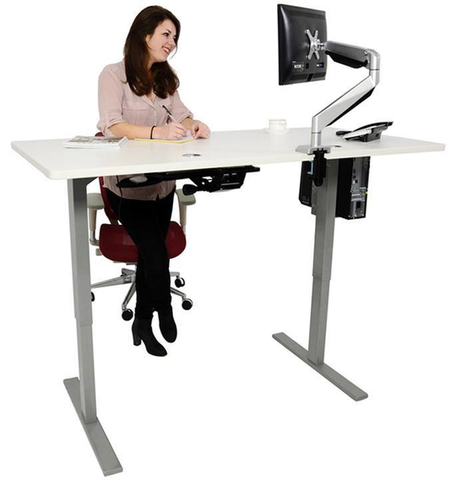
Advantages of Desktop Converters
- Zero installation required: Simply place the unit on your desk and start using it immediately
- Portable and temporary: Ideal for rental spaces, temporary work arrangements, or shared workstations
- Lower initial cost: Generally the most affordable option for height adjustment
- No power requirements: Works anywhere without needing electrical outlets
Limitations of Desktop Converters
The primary drawback of converters is their consumption of desk real estate. These units typically measure 6-12 inches in height even in their lowest position, effectively reducing your usable workspace. The platform on top of the converter is invariably smaller than your original desk surface, which can be problematic if you work with multiple monitors, reference materials, or specialized equipment.
Additionally, converters have limited weight capacities—typically 15-35 pounds—which may be insufficient for setups with multiple large monitors or heavy equipment. The manual adjustment mechanism can also become tedious if you switch positions frequently throughout the day, and the stability of converters is generally inferior to integrated lift systems.
How do mechanical (manual crank) standing desk lifts work?
Mechanical lift systems replace your desk's existing legs with height-adjustable columns that use a manual crank mechanism to raise or lower the entire work surface. This approach preserves your full desktop area while providing a more stable and integrated solution than converters.
How Mechanical Lifts Operate
Most mechanical standing desk lifts employ a worm gear or scissor mechanism activated by a hand crank. Turning the crank drives a threaded rod or gear system that extends or retracts telescoping columns, changing the desk height. The gear reduction provides mechanical advantage, making it relatively easy to lift even heavy loads, though the process takes time—typically 30-60 seconds to transition from sitting to standing height.
Benefits of Mechanical Lifts
- Full desktop utilization: Your entire desk surface remains usable since no converter sits on top
- Higher weight capacity: Typically supports 100-200 pounds depending on the system
- Superior stability: Integrated mounting provides better load distribution than desktop converters
- No electrical requirements: Operates without power, making placement flexible
- Reliable longevity: Fewer components than electric systems means less that can fail
Drawbacks of Mechanical Lifts
The manual adjustment process, while reliable, becomes inconvenient with frequent use. If you plan to switch between sitting and standing multiple times per day, the time and effort required for each adjustment can discourage regular position changes—defeating the ergonomic purpose of the system. Installation is also more involved than simply placing a converter on your desk, requiring assembly and mounting of the lift mechanism to your desktop.
How do electric standing desk lifts work?
Electric standing desk lifts represent the pinnacle of adjustable workstation technology, utilizing motorized linear actuators to provide effortless, push-button height adjustment. These systems deliver the best combination of convenience, stability, and advanced features, making them the preferred choice for serious ergonomic workspaces.

Electric Lift Technology Explained
Electric standing desk systems use synchronized DC motor-driven actuators integrated into each leg column. When activated via a control box, these actuators extend or retract simultaneously, raising or lowering the desk surface smoothly and quietly. Quality systems incorporate anti-collision detection, memory presets for favorite heights, and soft-start/soft-stop functionality to prevent jarring movements.
The actuators themselves are typically 24V or 36V DC systems with built-in limit switches to prevent over-extension. More advanced models include feedback actuators that provide precise position information, enabling accurate height memory functions and synchronized movement even under asymmetric loads.
Advantages of Electric Systems
- Effortless adjustment: Transition from sitting to standing in 10-20 seconds with a button press
- Programmable memory positions: Save preferred heights for different users or tasks
- Encourages frequent position changes: The ease of adjustment promotes better ergonomic habits
- Superior weight capacity: Heavy-duty systems support 200-350+ pounds
- Advanced features: Many include USB charging ports, cable management, and smartphone app control
- Professional appearance: Clean, integrated design suitable for any office environment
Considerations for Electric Lifts
Electric systems require access to power outlets and represent a higher initial investment than manual alternatives. However, the price difference has narrowed considerably in recent years, with quality electric systems now available at surprisingly competitive prices. The slight increase in complexity means there are more components that could potentially fail, though quality systems from reputable manufacturers typically offer warranties of 5-10 years.
Installation complexity is similar to mechanical lifts—you'll need to attach the lift mechanism to your desktop and ensure proper alignment. However, you'll also need to route power cables and position the control box within reach, which requires some planning for cable management.
What specifications matter most for an electric standing desk?
When evaluating electric standing desk lifts, understanding the technical specifications is crucial for ensuring the system meets your needs. Here are the critical factors to consider:
Height Range and Ergonomics
The height range defines the minimum and maximum desk height the system can achieve. For proper ergonomic performance, you need a system that can accommodate both your sitting and standing postures. When seated, your elbows should rest at 90 degrees with your forearms parallel to the floor. When standing, the same principle applies.
Most quality electric desk lifts offer a height range of approximately 22-48 inches, which accommodates users from about 5'0" to 6'5" tall. However, if you're particularly tall or short, verify that the system's range suits your proportions. Some systems offer extended ranges up to 50+ inches for taller users.
Weight Capacity Specifications
Weight capacity indicates the maximum load the desk can safely support. This isn't just about the weight of your monitors and keyboard—you need to account for the desktop itself, all equipment, and the dynamic loads created when you lean on the desk or add/remove items.
For reference:
- Single monitor setup with laptop: 30-50 pounds
- Dual monitor setup with desktop computer: 60-100 pounds
- Triple monitor setup with equipment: 100-150 pounds
- Heavy professional equipment (video editing, CAD workstations): 150-250+ pounds
Always select a system rated for at least 50% more than your anticipated load to ensure stability and longevity. Higher capacity systems also tend to have more robust construction, contributing to better overall stability.
Base Width Adjustability
Base width refers to the distance between the desk legs or the span of the frame. Most electric lift systems offer adjustable width to accommodate different desktop sizes, typically ranging from 40-70 inches. This adjustability is crucial because your desktop width must be supported adequately without the legs extending beyond the desk edges.
Some advanced systems provide individual column lift units that can be positioned independently, offering maximum flexibility for unusual desk shapes or sizes. This modular approach is particularly useful for L-shaped or custom configurations.
Two-Stage vs. Three-Stage Columns
The number of stages refers to how many telescoping sections make up each lift column. This specification significantly impacts both the stability and height range of the system.
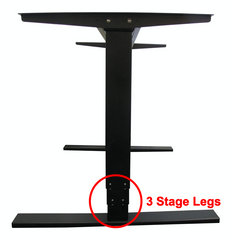
Two-stage columns have two telescoping sections and are generally found in economy systems or those with more limited height ranges. The advantage is simpler construction and potentially lower cost. However, they offer less overlap between sections at maximum extension, which can reduce stability.
Three-stage columns incorporate three telescoping sections, providing greater height adjustment range while maintaining more overlap between sections at any given height. This results in superior stability—a critical factor for desk applications where any wobble or flex becomes immediately noticeable and problematic. The additional stage also allows for either greater height range or a lower minimum height, improving ergonomic versatility.
For any serious standing desk application, three-stage columns are strongly recommended. The improved stability is immediately apparent and makes a substantial difference in the usability of the desk, particularly when typing or using precision input devices.
Number of Legs and Desk Configurations
Standard rectangular desks typically use two-leg or four-leg configurations. Two-leg systems with a wide frame provide excellent stability for most applications and are easier to configure. Four-leg systems offer maximum weight capacity and stability, particularly for very large or heavy desks.
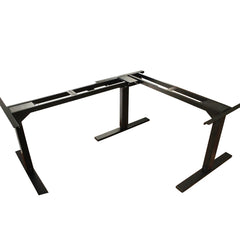
For L-shaped or corner desks, three-leg configurations are available, with one leg positioned at the corner junction to provide support for both desk sections. These specialized systems require careful planning during installation but deliver the stability needed for larger, asymmetric workspaces.
Speed and Noise Specifications
Travel speed is typically measured in inches per second and generally ranges from 1.0 to 1.5 inches per second for standing desk applications. This translates to approximately 15-25 seconds for a full-range adjustment. Faster isn't necessarily better—excessively fast movement can feel jarring and may cause items on the desk to shift or tip.
Noise level is measured in decibels (dB), with quality systems operating at 45-55 dB—roughly equivalent to quiet conversation or a modern refrigerator. Lower-quality systems may produce 60+ dB, which becomes noticeably intrusive in quiet office environments. If you work in shared spaces or take video calls, noise specification becomes particularly important.
What advanced features should you look for?
Memory Presets and Control Options
Quality electric standing desk systems include memory preset functionality, allowing you to save two to four preferred height positions. This feature is invaluable for shared workspaces or if you regularly switch between different working postures (sitting, perching, standing). Advanced systems may include smartphone app control, voice activation compatibility, or integration with smart home systems.
Anti-Collision Technology
Anti-collision detection uses sensors to detect resistance during height adjustment. If the desk encounters an obstacle—such as an open drawer, cabinet, or even a pet—the system automatically stops and reverses slightly. This safety feature prevents damage to both the desk mechanism and objects in its path, and it's particularly important in home offices where the working environment may be less controlled than corporate settings.
Power Supply Considerations
Most electric standing desks operate on low-voltage DC power (24V or 36V) supplied by an AC adapter. The power supply is typically positioned under the desk and should be securely mounted to prevent accidental disconnection. Some systems draw power only during adjustment, while others maintain a small standby current to power the control electronics and memory functions.
Cable Management Solutions
As your desk moves up and down, all cables connected to equipment on the surface must flex accordingly. Proper cable management prevents tangled cables, reduces wear on connectors, and maintains a clean appearance. Quality standing desk systems include cable trays, wire clips, or cable sleeves designed to organize and protect cables during movement. Plan your cable routing carefully during installation to ensure adequate slack for full-range movement without excess that can catch or tangle.
How do you choose the right standing desk lift?
Choosing the optimal standing desk lift system requires honest assessment of your usage patterns, workspace constraints, and budget. Here's a practical framework for making this decision:
Choose a desktop converter if:
- You're trying standing desks for the first time and want minimal commitment
- You work in a temporary space or move frequently
- Your budget is very limited (under $150)
- You have a light equipment load (single laptop or monitor)
- You only switch positions once or twice daily
Choose a mechanical lift system if:
- You have a moderate budget ($200-400)
- Power outlet access is limited at your workspace
- You switch positions infrequently (once or twice daily)
- You value mechanical simplicity and reliability
- You're willing to invest a bit more effort for better stability than converters
Choose an electric lift system if:
- You plan to switch positions multiple times daily
- You have a moderate to generous budget ($400-1200+)
- Convenience and ease of use are priorities
- Multiple users will share the workspace
- You have a heavy equipment load requiring maximum stability
- You want the most professional, integrated solution
What does standing desk lift installation involve?
For mechanical and electric lift systems, proper installation is crucial for optimal performance. Most systems require:
- Desktop preparation: Your desktop should be flat, sturdy, and ideally 1 inch thick or greater for secure mounting
- Accurate measurement: Carefully measure and mark mounting positions to ensure the frame is square and centered
- Assembly: Follow manufacturer instructions precisely, particularly regarding torque specifications for fasteners
- Leveling: Use a level to ensure the frame is perfectly horizontal before attaching the desktop
- Cable routing: Plan power and data cable paths before finalizing the installation
- Testing: Verify smooth operation through the full height range with no binding or unusual noise
Most installations can be completed in 1-2 hours with basic tools. However, if you're uncomfortable with assembly or have a particularly complex setup, professional installation services are often available.
How do you maintain a standing desk lift for long service life?
Quality standing desk lifts, particularly electric systems using robust industrial actuators, are designed for years of daily use with minimal maintenance. However, following these practices will ensure optimal performance:
- Periodically check all fasteners and tighten any that have loosened due to vibration
- Keep the sliding surfaces of telescoping columns clean and free of debris
- Avoid exceeding the rated weight capacity
- Distribute weight evenly across the desktop surface
- For electric systems, ensure the power supply remains properly connected and ventilated
- If you notice unusual noise, binding, or uneven movement, stop using the system and inspect for issues
Most manufacturers provide warranties ranging from 3-10 years depending on the system quality. Premium systems with heavy-duty components may include lifetime warranties on the frame and extended coverage on electrical components.
What usually goes wrong with electric standing desk lifts?
Across thousands of installs, a handful of failure modes account for nearly all field issues:
- Column desynchronization. One leg extends faster than the other, causing the desktop to tilt. Usually traced to a controller that lost its position reference or a feedback signal issue. Most systems require a reset routine driving both legs fully down to re-zero.
- Wobble at standing height. Often a two-stage column at full extension with insufficient section overlap, or loose fasteners between the desktop and the lift frame. Tighten all hardware before assuming a column fault.
- Overload damage. Running the system above its rated load shortens duty cycle and can stall the motors. Heavy monitor arms, weighted accessories, and leaning add up faster than users expect.
- Side-loading from leaning. Users routinely lean on the desk edge. Over thousands of cycles, this side load — not the vertical load — wears column bushings and increases play.
- Cable tangling. As the desk travels, cables can catch on the frame or floor. Pinched or stretched cables can disconnect mid-travel or damage the anti-collision sensing.
- Anti-collision false triggers. An open drawer below the desk, a chair armrest, or even a thick rug under one foot can trigger the obstacle-detection reverse.
How should you test a standing desk lift before trusting it?
A working system on the first cycle is not a proven system. Run these checks before signing off on an install:
- Full-range cycle test, unloaded. Drive the desk from minimum to maximum height and back. Listen for grinding, binding, or hesitation at any point — especially at full extension where columns are most stressed.
- Loaded cycle test. With your actual equipment installed, repeat the full-range cycle. The hard part of travel is at full extension under load, not the easy middle. Time the travel and compare to the spec.
- Level check at three heights. Use a level on the desktop at minimum, mid, and maximum height. If level drifts, one column is moving faster than the other and synchronization needs a reset.
- Side-load check. With the desk at standing height, push laterally on the front edge with moderate force. Excessive wobble indicates either two-stage columns at the limit of their stability or loose frame fasteners.
- Anti-collision verification. With the desk descending, place a soft object in its path (for example, push up on the underside with a closed fist). The system should stop and reverse without forcing through.
- Repeat cycle test. Run 10–20 full cycles with load before signing off. A system that works once proves the idea; repeated cycles prove the install.
Conclusion
Standing desk lifts have evolved from niche ergonomic accessories to mainstream workplace essentials, and for good reason. The health benefits of alternating between sitting and standing throughout the workday are well-documented, but only if the system is convenient enough to encourage regular use. While desktop converters provide an accessible entry point and mechanical lifts offer a solid middle ground, electric standing desk systems powered by precision linear actuators deliver the optimal combination of convenience, stability, and long-term value.
The key to selecting the right system lies in honest assessment of your needs, understanding the technical specifications that matter, and choosing a solution that encourages rather than discourages healthy posture changes. Whether you opt for a basic converter or a fully-featured electric system, the investment in a standing desk lift is an investment in your long-term health and productivity.
Frequently Asked Questions
How often should I switch between sitting and standing during the day?
Ergonomics experts generally recommend following a 20-8-2 rule: for every 30 minutes, spend 20 minutes sitting, 8 minutes standing, and 2 minutes moving around. This translates to switching positions roughly every 30-40 minutes. However, listen to your body—if you feel discomfort in either position, it's time to change. The goal isn't to stand all day but to avoid prolonged static postures of any kind. Electric standing desk systems make this frequent switching practical, while manual systems may result in less frequent changes due to the effort required.
What weight capacity do I really need for my standing desk?
Calculate the total weight of your desktop, all monitors, computers, equipment, and accessories, then add at least 50% as a safety margin. For example, if your equipment totals 60 pounds and your desktop weighs 40 pounds (100 pounds total), choose a system rated for at least 150 pounds. This safety margin accounts for dynamic loads when you lean on the desk, add temporary items, or upgrade equipment in the future. Higher capacity systems also tend to have more robust construction, contributing to better stability even at lighter loads.
Are two-stage or three-stage columns better for standing desks?
Three-stage columns are superior for standing desk applications and should be your default choice. While two-stage columns can work for basic setups, three-stage columns provide significantly better stability due to greater overlap between telescoping sections at any given height. This is particularly important for standing desks because any wobble or flex becomes immediately noticeable and problematic when typing or working. The improved stability of three-stage systems is worth the modest price premium for any serious ergonomic workspace.
Can I build my own electric standing desk using individual actuators?
Yes, DIY standing desk builds are feasible using individual linear actuators or column lift units. This approach offers maximum customization for unusual desk shapes or specific requirements. However, you'll need to ensure the actuators are properly synchronized (using feedback actuators and appropriate control systems), adequately rated for your loads, and securely mounted with appropriate mounting brackets. You'll also need to source a compatible control box and power supply. While this requires more technical knowledge than purchasing a complete system, it can result in a highly customized solution at potentially lower cost.
What is the typical lifespan of an electric standing desk system?
Quality electric standing desk systems using robust actuators are designed for 10,000-20,000+ cycles, which translates to many years of daily use. If you switch positions four times daily, a 10,000-cycle system will last approximately 7 years. Premium systems with heavy-duty components may exceed 50,000 cycles. The actual lifespan depends heavily on usage patterns, load weight, maintenance, and component quality. Systems using proven industrial actuators from reputable manufacturers typically outlast economy systems by a significant margin, making them better long-term investments despite higher initial costs.
Do standing desks require special flooring or anti-fatigue mats?
While standing desks don't require special flooring, using an anti-fatigue mat is highly recommended when standing for extended periods. These cushioned mats reduce stress on feet, legs, and lower back by encouraging subtle movements and providing support. The mat should be thick enough to provide cushioning (typically 3/4 to 1 inch) but not so soft that it becomes unstable. Position the mat so you can easily step on and off it, and consider using a chair mat or bare floor for sitting positions to allow your chair to roll freely. Quality anti-fatigue mats are an inexpensive addition that significantly improves the standing desk experience.
About the Author
This article was written by Robbie Dickson, Founder and Chief Engineer of FIRGELLI Automations. Robbie has designed motion-control and linear actuator systems for desk lifts, TV lifts, and industrial automation for over two decades. Prior to founding FIRGELLI in 2002, he worked as an engineer at Rolls-Royce, BMW, Isuzu, and Ford. Read more on his Wikipedia page.


